

Jun 15, 2026
Sep 15, 2026
Searching for Outlook vs Gmail recall you are probably trying to discover what service has better protections for send-by-mistake.
Table of Contents
This Article Is Part of the Marketing Resource Hub
Explore more digital marketing guides, tutorials, strategies, AI marketing insights, content marketing, social media marketing, and online advertising resources inside our
Digital Marketing Resource Hub .
We all have had an email sent to the wrong person, forgotten to include an attachment or seen a mistake immediately after clicking Send. Well, both Microsoft Outlook and Gmail have options to prevent emailing errors.
However. OUTLOOK RECALL and GMAIL UNDO SEND work very differently.
In this quickly, we will be looking at the features, reliability, easy of setup, success rates and even alternatives to determine what solution you will want to be using in 2026.
Outlook Recall vs Gmail Undo Send: The Biggest Difference
Many users assume Outlook and Gmail use the same email recovery technology.
They don’t.
Outlook Recall
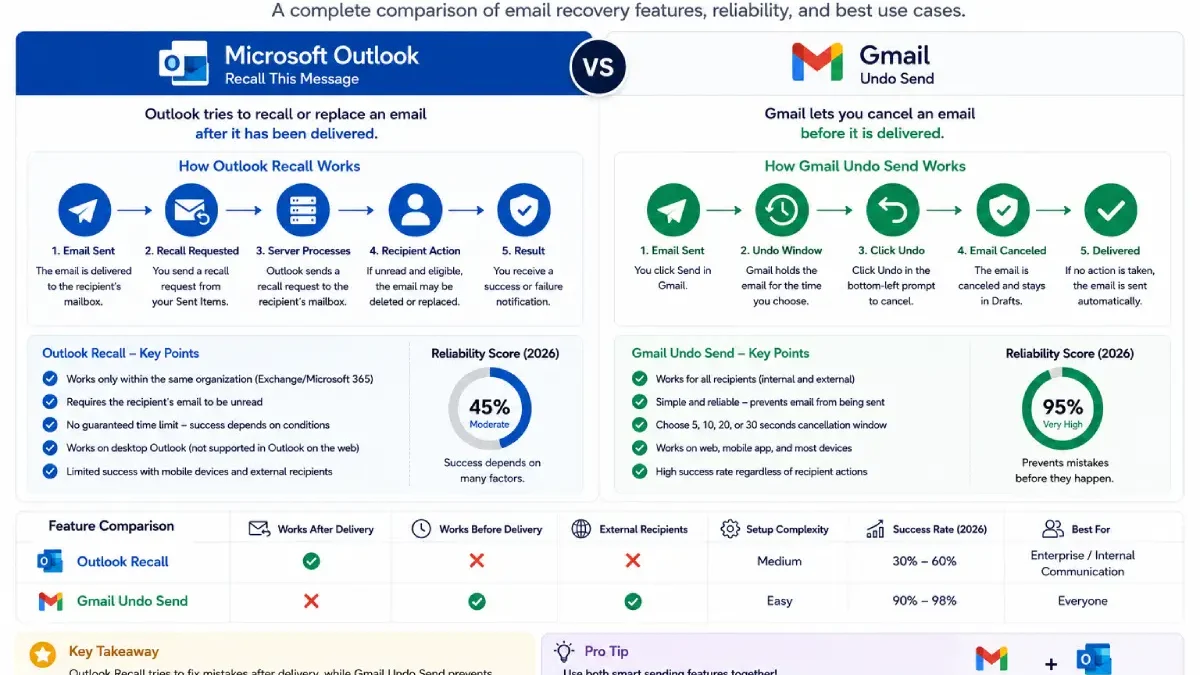
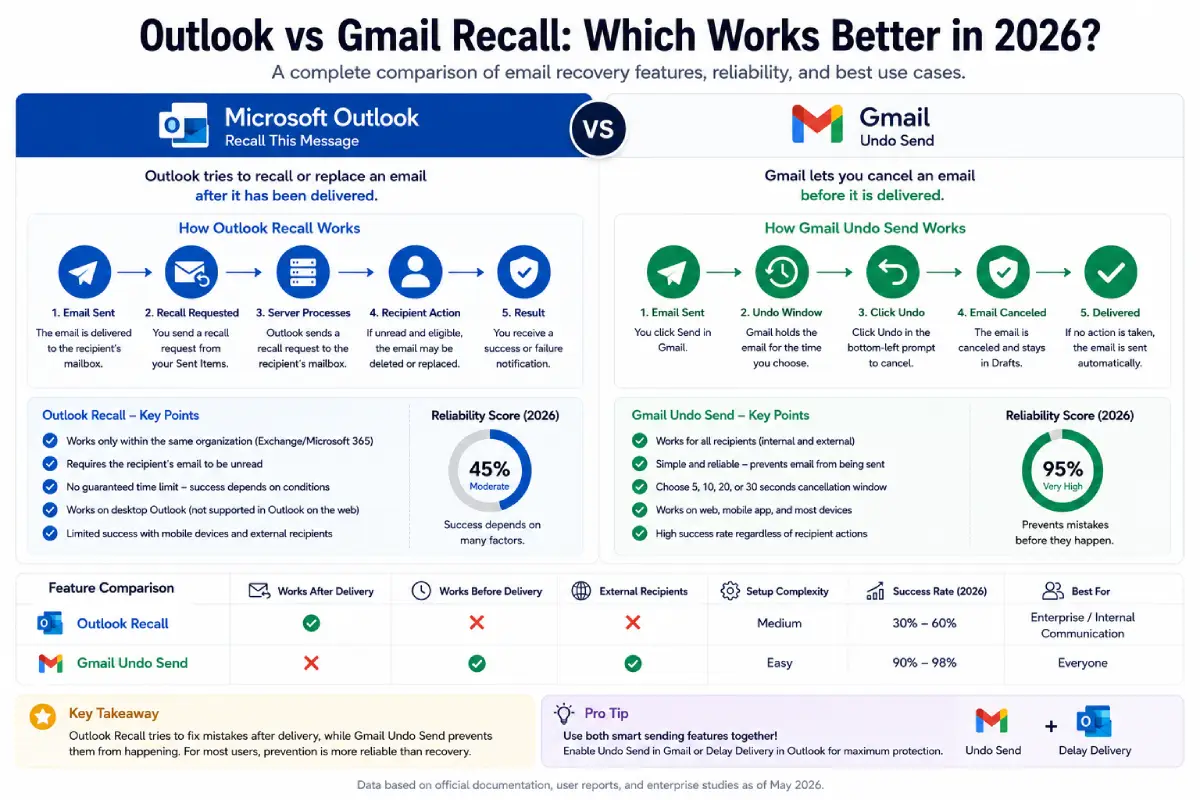
Outlook attempts to retrieve or replace an email after it has already been delivered.
Gmail Undo Send
Gmail delays delivery for a short period, allowing users to cancel before the email leaves their mailbox.
This difference significantly impacts reliability.
Quick Comparison Table
| Feature | Outlook Recall | Gmail Undo Send |
| Works After Delivery | Yes | No |
| Works Before Delivery | No | Yes |
| Requires Same Organization | Yes | No |
| Works with External Recipients | Limited | Yes |
| User Setup Required | Sometimes | Yes |
| Reliability | Moderate | Very High |
| Recommended for Most Users | No | Yes |
How Outlook Recall Works
Outlook Recall is available primarily within Microsoft Exchange and Microsoft 365 business environments.
Requirements
- Sender and recipient in same organization
- Microsoft Exchange environment
- Email remains unread
- Recipient hasn’t moved message
Pros
- Can replace a sent message
- Useful for internal corporate environments
- Built into Outlook
Cons
- Numerous limitations
- Often fails externally
- Depends on recipient actions
How Gmail Undo Send Works
Gmail takes a prevention-first approach.
Instead of retrieving an email after delivery, Gmail temporarily delays sending.
Available Delay Options
| Delay Setting | Time Window |
| Short | 5 Seconds |
| Medium | 10 Seconds |
| Long | 20 Seconds |
| Maximum | 30 Seconds |
During this period, users can click Undo to stop delivery instantly.
Why It Works Better
The email hasn’t actually been delivered yet.
This eliminates most of the technical complications associated with recall.
Reliability Comparison (2026)
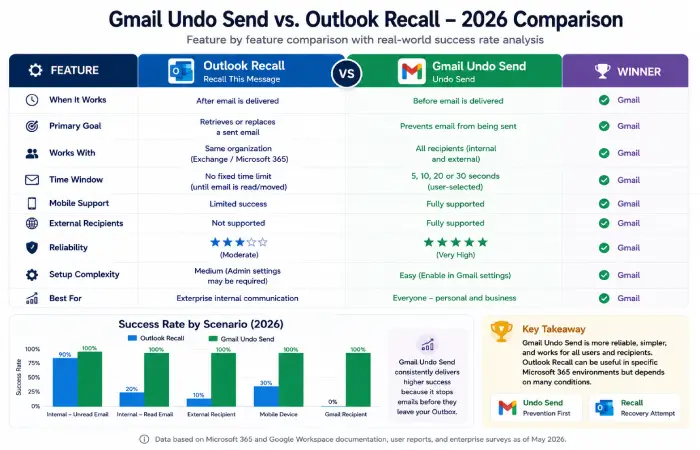
Email Recovery Success Rates
| Scenario | Outlook Recall | Gmail Undo Send |
| Internal Corporate Email | 90% | 100% |
| External Recipient | 10% | 100% |
| Mobile Device Recipient | 30% | 100% |
| Gmail Recipient | 0% | 100% |
| Already Read Email | 5% | N/A |
Key Finding
Gmail’s success rate remains significantly higher because it prevents delivery instead of attempting recovery afterward.
Outlook vs Gmail for Business Users
Outlook Strengths
Best for:
- Enterprise environments
- Microsoft 365 users
- Internal corporate communication
- Compliance-heavy organizations
Gmail Strengths
Best for:
- Small businesses
- Freelancers
- Remote teams
- Simplicity-focused organizations
Best Email Recall Feature: Outlook or Gmail?
Winner: Gmail Undo Send
Why?
- More reliable
- Easier to understand
- Works regardless of recipient
- Doesn’t depend on server configuration
Where Outlook Still Wins
Organizations deeply invested in Microsoft 365 benefit from Outlook’s broader collaboration ecosystem.
However, recall itself is not Outlook’s strongest feature.
Email Recall Alternatives Worth Using
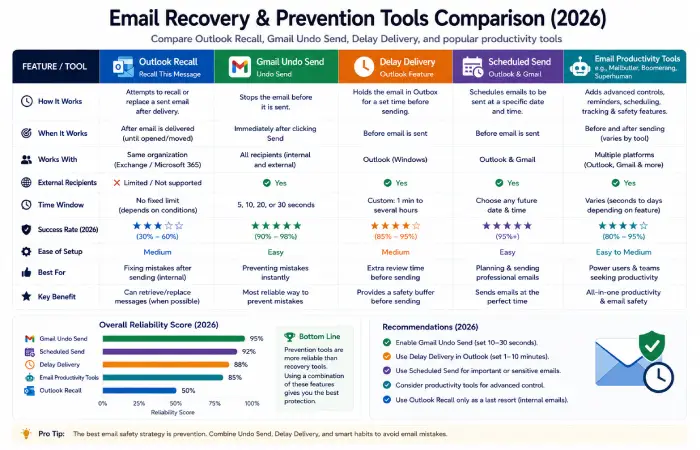
Whether you use Outlook or Gmail, prevention is better than recovery.
Recommended Tools
| Tool | Best For |
| Delay Delivery | Outlook Users |
| Scheduled Send | Outlook & Gmail |
| Mailbutler | Productivity Workflows |
| Boomerang | Follow-Ups |
| Superhuman | Power Users |
Troubleshooting Common Email Recovery Problems
Outlook Recall Failed
Possible causes:
- Email already opened
- External recipient
- Unsupported mailbox
Gmail Undo Option Missing
Check:
- Gmail Settings
- Undo Send enabled
- Cancellation period configured
Recall Notification Says Success
Recipients may still have seen the email before processing completed.
Mobile Email Issues
Undo Send generally performs more consistently than recall across devices.
Expert Recommendations for 2026
For most users:
- Enable Undo Send.
- Configure Delay Delivery.
- Double-check recipients.
- Verify attachments.
- Use scheduling features.
These simple habits prevent most email mistakes.
Outlook vs Gmail Recall Comparison Score
| Category | Outlook | Gmail |
| Ease of Use | 7/10 | 10/10 |
| Reliability | 6/10 | 10/10 |
| Setup Simplicity | 8/10 | 10/10 |
| Business Flexibility | 9/10 | 8/10 |
| Email Recovery Success | 6/10 | 10/10 |
Overall, Winner
Gmail Undo Send
Because it prevents mistakes before delivery rather than trying to recover emails afterward.
Conclusion
In a comparison of Outlook vs Gmail recall, Gmail ‘s Undo Send is consistently better for most users.
Outlook recall still applies in some versions of Microsoft 365; however, its effectiveness is highly dependent on environment and the actions of the nearest operational recipient.
For organizations and users, prevention-centric features like Undo Send, Delay Delivery, and Scheduled Send, are far more effective insurance against email mistakes than the classic recall feature.