

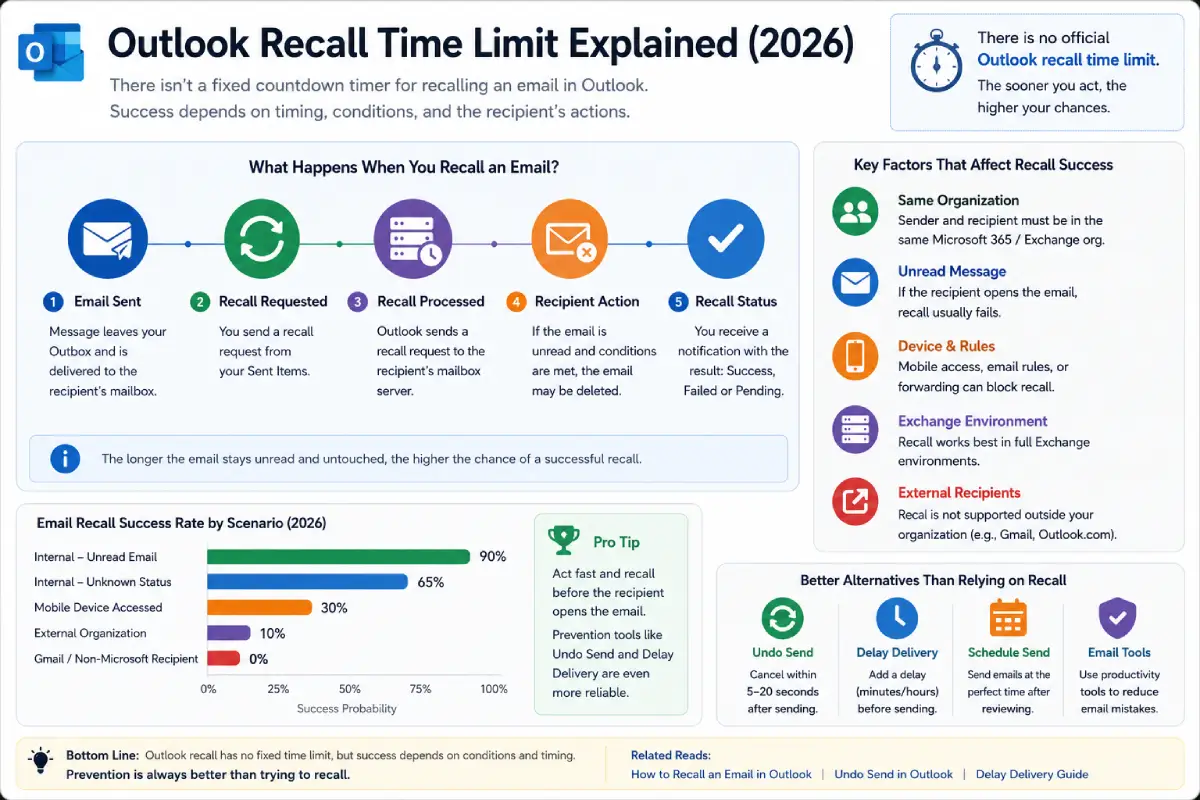
Jun 15, 2026
Sep 15, 2026
Looking for Outlook recall time limit? Perhaps you‘ve just sent an email and wished you could take it back.
Table of Contents
This Article Is Part of the Marketing Resource Hub
Explore more digital marketing guides, tutorials, strategies, AI marketing insights, content marketing, social media marketing, and online advertising resources inside our
Digital Marketing Resource Hub .
Did you make a typo? Attach the wrong file? Send your email to the wrong person? The most common question a user asks is just:
At first, how much time do I have to recall an email in Outlook?
The answer, it turns out, is a bit more complex than that. Outlook doesn ‘t has a set time you can revert it in the way Gmail does with Undo Send it all depends on a number of technical factors, how the recipient ‘s email client operates, and the email server configurations.
Provides an overview of Outlook recall timing, its success factors and alternatives and best practices for 2026.
How long do I have to recall an email in Outlook?
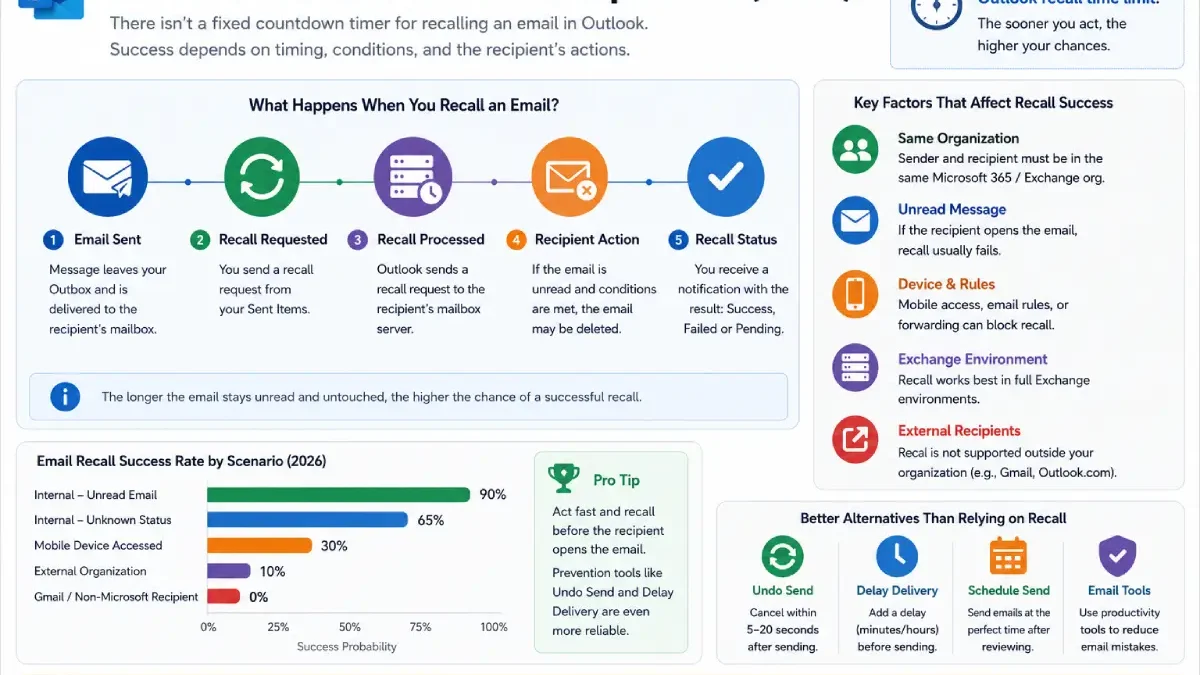
The answer is more complicated than many people realize. Unlike Gmail’s Undo Send feature, Outlook doesn’t have a fixed recall countdown timer. Instead, success depends on several technical conditions, recipient behavior, and email server settings.
This guide explains Outlook recall timing, success factors, alternatives, and best practices for 2026.
What Is the Outlook Recall Time Limit?
Technically, Outlook does not impose a strict time limit for recalling an email.
Instead, recall works only if certain conditions are met.
Outlook Recall Requirements
- Sender and recipient use Microsoft Exchange or Microsoft 365
- Recipient is within the same organization
- Email remains unread
- Recipient hasn’t moved the email
- Outlook supports recall in the environment
If these conditions remain true, a recall may still succeed even hours later.
However, once the recipient reads the message, recall typically fails.
Outlook Recall Timing Explained
Many users assume Outlook provides a 5-minute or 10-minute recall window.
That’s not how Outlook works.
What Actually Matters
| Factor | Impact on Recall Success |
| Email Opened | Very High |
| Same Organization | High |
| Exchange Environment | High |
| Recipient Rules | Medium |
| Time Elapsed | Medium |
| Mobile Email Access | High |
Key Takeaway
The recipient opening the email is usually more important than the amount of time that has passed.
How Fast Does Outlook Recall Work?
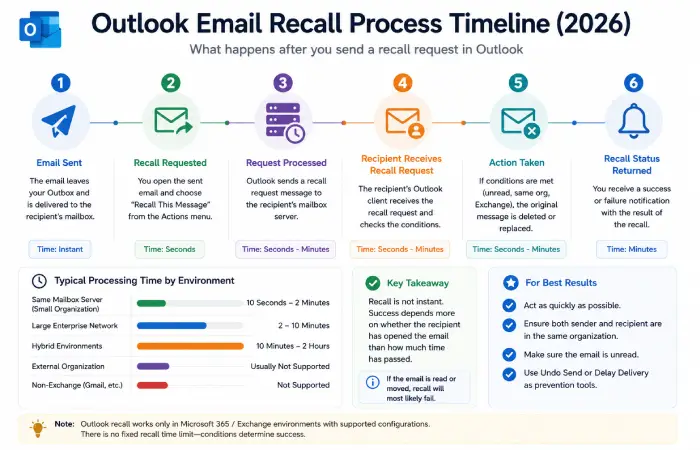
After submitting a recall request, Outlook sends a special message requesting deletion of the original email.
Typical Processing Times
| Environment | Estimated Processing Time |
| Same Mailbox Server | Seconds to Minutes |
| Large Enterprise Network | Minutes |
| Hybrid Environments | Minutes to Hours |
| External Recipients | Usually Not Supported |
The recall request itself is not instantaneous.
This is why many recalls fail before processing completes.
Outlook Recall vs Undo Send
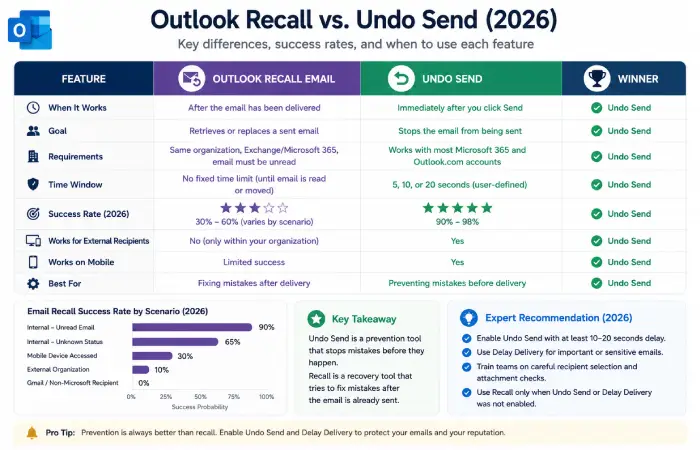
Many users confuse recall with Undo Send.
Feature Comparison
| Feature | Outlook Recall | Undo Send |
| Works Before Delivery | No | Yes |
| Works After Delivery | Yes | |
| Depends on Recipient Actions | Yes | No |
| Reliability | Low to Moderate | High |
| Recommended in 2026 | No | Yes |
Why Undo Send Wins
Undo Send prevents the email from leaving your mailbox.
Recall attempts to retrieve an email after delivery.
Prevention is almost always more reliable.
Outlook Recall Success Rates (2026)
Based on enterprise email administrator reports and Microsoft 365 user experiences, recall success rates vary significantly.
Estimated Recall Effectiveness
| Scenario | Success Rate |
| Unread Internal Email | 80-90% |
| Read Internal Email | 10-20% |
| External Recipient | Near 0% |
| Mobile Device Opened | Very Low |
| Gmail Recipient | Not Supported |
Visualization Data
Email Recall Success Score:
- Unread Internal Recipient: 90
- Internal Recipient (Unknown Status): 65
- Mobile Accessed Recipient: 30
- External Recipient: 5
- Gmail Recipient: 0
How to Recall an Email Quickly
Step 1
Open Outlook.
Step 2
Go to Sent Items.
Step 3
Open the message.
Step 4
Select:
Message → Actions → Recall This Message
Step 5
Choose:
- Delete unread copies
- Delete and replace message
Step 6
Track recall status notifications.
The faster you act, the better your chances.
Better Alternatives to Outlook Recall
Most IT professionals recommend prevention tools instead.
Outlook Delay Delivery
Adds a sending delay before emails leave your Outbox.
Undo Send
Allows cancellation within seconds after clicking Send.
Scheduled Send
Lets users review messages before delivery.
Email Productivity Tools
Popular options include:
- Mail butler
- Boomerang
- Superhuman
These solutions reduce the need for recalls entirely.
Troubleshooting Outlook Recall Failures
Recall Option Missing
Possible causes:
- New Outlook experience enabled
- Unsupported account type
- Mac version limitations
Recall Says Successful But Recipient Saw Email
This is common.
The recipient may have opened the email before the recall completed.
Recall Doesn’t Work Outside Organization
This is expected.
Recall primarily supports Microsoft Exchange environments.
Recall Request Still Pending
Large organizations may experience processing delays.
Best Practices for Avoiding Email Mistakes
Enable Undo Send
A 10–20 second delay catches many mistakes.
Use Delay Delivery
Many businesses automatically delay outgoing mail by several minutes.
Double-Check Recipients
Especially when using autocomplete.
Review Attachments
Missing attachments remain one of the most common email errors.
Use Productivity Tools
Modern email assistants catch errors before delivery.
Outlook Recall Time Limit vs Alternative Solutions
| Method | Effective Time Window | Reliability |
| Recall Email | Until Email Is Read | Medium |
| Undo Send | 5-20 Seconds | High |
| Delay Delivery | Minutes to Hours | Very High |
| Scheduled Send | Days to Months | Very High |
| Correction Email | Unlimited | High |
Conclusion
Indeed whether recall will work or not is dependent on whether the recipient has read the message and whether the email environment can be recalled.
For most users of 2026, the protections provided by the likes of Undo Send, Delay Delivery, and Scheduled Send are far more secure than using email recall.
Rather than calling back forgetting mail, catch the errors before they go out.