

Jun 15, 2026
Sep 15, 2026
When you search for alternatives for recalling emails in Outlook, this generally indicates that you’ve already experienced a common workplace headache – sending an email prematurely, to the wrong person or sending it with wrong data.
Table of Contents
This Article Is Part of the Business Resource Hub
Explore more digital marketing guides, tutorials, strategies, AI marketing insights, content marketing, social media marketing, and online advertising resources inside our
Business Tools Resource Hub .
Even though Microsoft Outlook has recall functionality embedded, this method has severe limitations. In most cases, your memory requests will be denied by the receiver since he/she may have already read the email, has a different mail service, or receives messages from outside your enterprise.
That’s why many professionals now rely on email delay tools, email scheduling software, Outlook productivity plugins, and secure email sending tools instead of traditional email recall.
This guide compares the best alternatives available in 2026 and explains which option works best for different business needs.
Why Outlook Email Recall Is No Longer Enough
Email recall sounds useful in theory. Unfortunately, in practice, it often fails.
Common reasons include:
- Recipient already opened the message
- Recipient uses Gmail or another provider
- Email was forwarded automatically
- Mobile email clients don’t support recall
- External recipients are involved
This has also led to companies becoming more interested in prevention rather than cure, by focusing on tools that enable them to prevent the error occurring in the first place rather than being able to retrieve the email post-delivery.
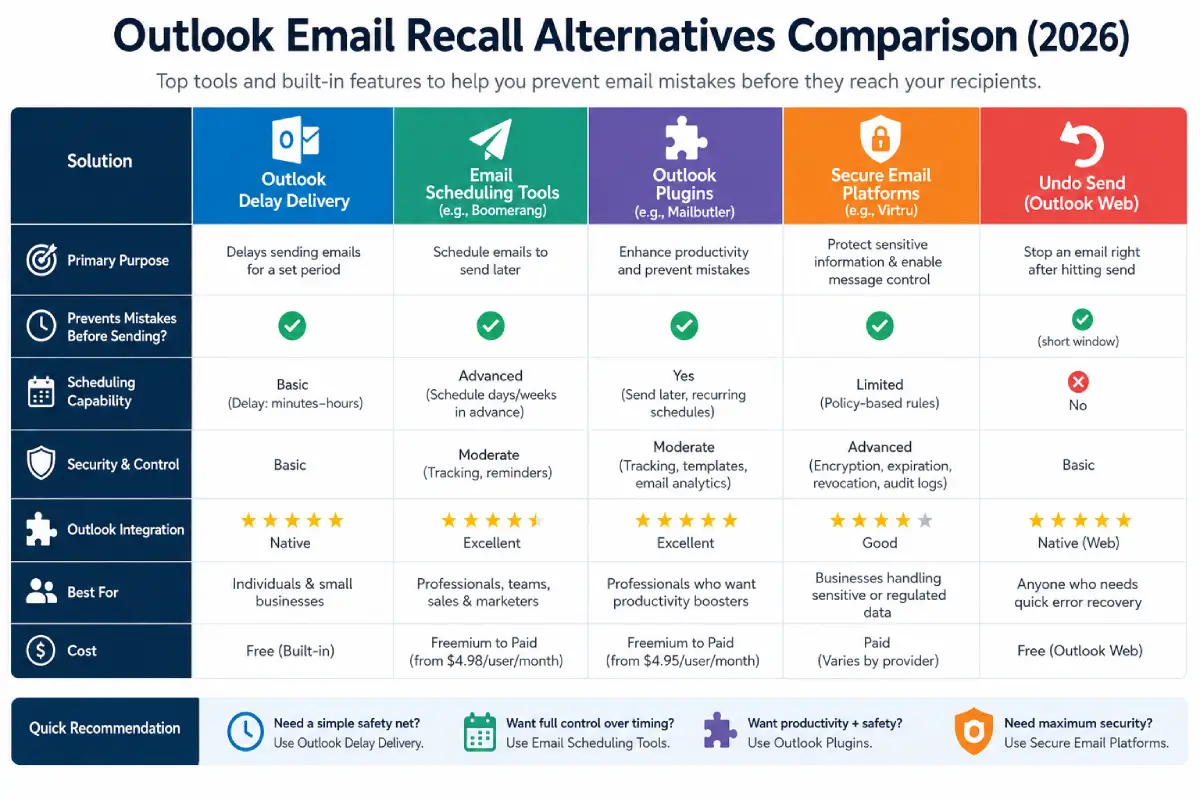
Comparison Table: Best Outlook Email Recall Alternatives
| Solution | Prevents Mistakes Before Sending | Scheduling | Security Controls | Best For |
| Outlook Delay Delivery | Yes | Yes | Basic | Individuals |
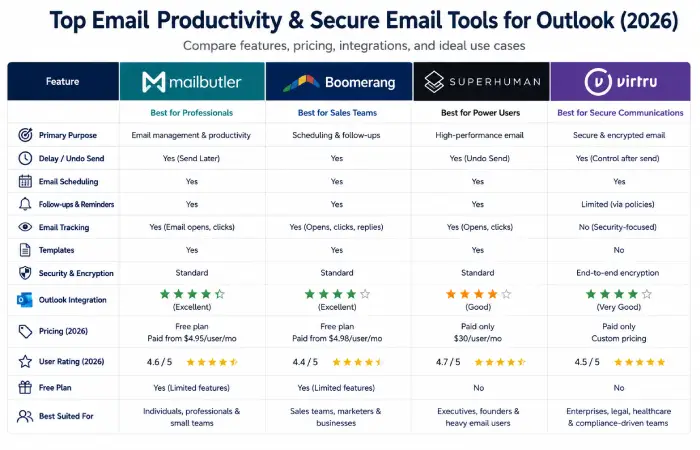
| Mailbutler | Yes | Yes | Moderate | Professionals |
| Boomerang | Yes | Yes | Moderate | Sales Teams |
| Superhuman | Yes | Advanced | Advanced | Executives |
| Virtru | Yes | Yes | Enterprise Grade | Compliance |
| Mimecast | Yes | Limited | Enterprise Grade | Enterprises |
| Proofpoint | Yes | Limited | Enterprise Grade | Large Organizations |
Alternative #1: Outlook Delay Delivery
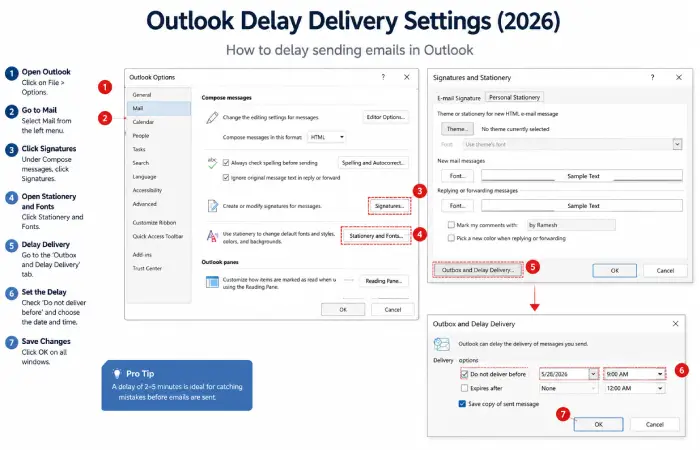
The easiest replacement for email recall is Outlook’s built-in Delay Delivery feature.
Instead of sending emails immediately, Outlook holds outgoing messages in your Outbox for a predefined period.
Many organizations configure a five-minute delay for every outgoing message.
Benefits
- Free
- Easy to configure
- Works with external recipients
- Prevents accidental sends
Best Use Case
Professionals who occasionally need extra time to catch mistakes before emails leave their inbox.
Alternative #2: Email Scheduling Tools
Modern email scheduling tools provide significantly more flexibility than recall requests.
Popular options include:
- Boomerang for Outlook
- Mailbutler
- Yesware
- Salesloft
These solutions allow users to:
- Schedule future emails
- Pause outgoing messages
- Create automated follow-ups
- Improve response rates
Why Users Prefer Scheduling
Scheduling gives users complete control over delivery timing, reducing the likelihood of rushed emails.
Alternative #3: Outlook Plugins for Email Recall Prevention
Several Outlook plugins focus on preventing errors before messages are delivered.
Popular Outlook Plugins
| Plugin | Primary Function |
| Mailbutler | Scheduling and Tracking |
| Boomerang | Reminders and Follow-Ups |
| SimplyFile | Inbox Organization |
| Yesware | Templates and Automation |
These tools improve productivity while reducing reliance on email recall.
Alternative #4: Undo Send Features
Modern email platforms increasingly prioritize “Undo Send” functionality.
Unlike recall, Undo Send keeps the message from leaving your mailbox for a short period.
Available In
- Outlook Web
- Gmail
- Superhuman
Advantages
- More reliable than recall
- Works instantly
- Doesn’t depend on recipient settings
Limitations
The cancellation window is usually limited to a few seconds.
Alternative #5: Secure Email Sending Tools
Organizations handling sensitive information require stronger protection.
Secure email sending tools provide controls that traditional email recall cannot offer.
Leading Secure Email Platforms
| Platform | Key Security Features |
| Virtru | Encryption and Revocation |
| Proofpoint | Compliance Controls |
| Mimecast | Threat Protection |
| Zix | Secure Delivery |
Benefits
- Message expiration
- Access revocation
- Encryption
- Compliance management
These solutions are particularly valuable in healthcare, finance, and legal industries.
Alternative #6: AI-Powered Email Assistants
Artificial intelligence has become an important layer of email protection.
Modern AI email assistants can detect:
- Missing attachments
- Incorrect recipients
- Unprofessional tone
- Sensitive information
- Grammar mistakes
These proactive checks reduce human error before emails are sent.
Alternative #7: Simple Correction Emails
Sometimes the best solution is also the simplest.
If an email has already been delivered, sending a corrected version often works better than attempting a recall.
Recommended Process
- Acknowledge the mistake.
- Provide corrected information.
- Use a clear subject line.
- Send the update immediately.
Many communication professionals consider this approach more reliable than recall requests.
Which Alternative Is Best for You?
| User Type | Recommended Solution |
| Individual Users | Outlook Delay Delivery |
| Small Businesses | Mailbutler |
| Sales Teams | Boomerang |
| Executives | Superhuman |
| Healthcare Organizations | Virtru |
| Large Enterprises | Proofpoint |
Troubleshooting Outlook Recall Issues
Recall Works Internally but Not Externally
This is normal. Recall primarily works within Microsoft Exchange environments.
Recall Request Shows Success
A success notification doesn’t guarantee the recipient never viewed the email.
Recall Missing on Mobile
Mobile Outlook apps typically support Undo Send rather than full recall functionality.
Delay Delivery Not Working
Ensure Outlook remains connected and running until the scheduled send time.
Building a Safer Email Workflow
The most effective strategy combines multiple layers of protection:
- Delay Delivery
- Email Scheduling
- AI Review Tools
- Secure Email Controls
- Employee Training
Organizations using this approach experience fewer email-related incidents and improved communication accuracy.
Conclusion
Outlook email recall remains useful in limited situations, but it should no longer be your primary defense against email mistakes.
The most effective Outlook email recall alternatives in 2026 focus on prevention rather than recovery. Email scheduling tools, Outlook productivity plugins, secure email sending platforms, and AI-powered assistants provide greater reliability and control.
For most professionals, combining Delay Delivery with scheduling and security tools creates a much safer email workflow than relying on recall requests alone.