



These are social media analytics tools that can help marketers determine what types of social posts generate interest and show how users interact with these content types. They enable the marketer to not individually check what performance is occurring on each platform’s dashboard, but to use a single platform were comparing channels, generating reports, and identifying performance trends can all be performed.
The optimal answer rests in whether you need to look at a few accounts, need a broad spectrum of reports and reporting functionality, a competitive reporting strategy, or more sophisticated analysis at scale.
Table of Contents
What Do Social Media Analytics Tools Measure?
These platforms collect information from connected social accounts and convert it into reports. Common measurements include impressions, reach, engagement, link clicks, video views, follower growth and publishing performance.
More advanced social media metrics tools may also provide:
- Paid and organic performance comparisons
- Competitor benchmarks
- Audience demographics
- Brand-mention monitoring
- Sentiment classification
- Campaign tagging
- Scheduled client reports
- Team and response-time analytics
- Conversion or revenue integrations
Social media performance analytics should begin with a business objective. Engagement matters for community building, but leads, purchases and qualified website visits may be more important for a sales campaign.
Comparison of the Best Social Media Analytics Software
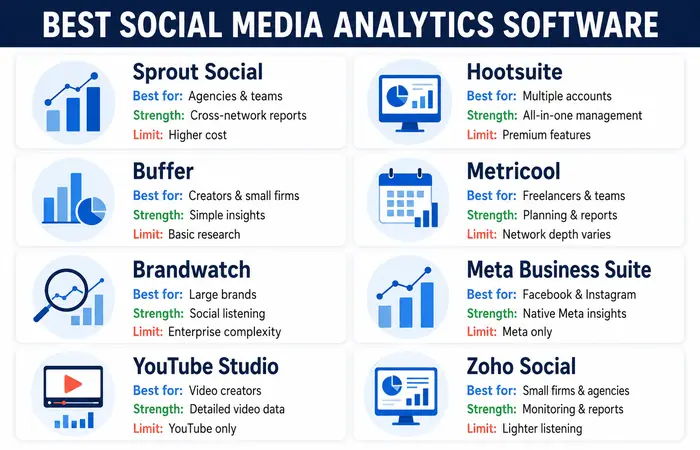
| Tool | Best suited to | Notable capability | Main limitation |
| Sprout Social | Agencies and established teams | Cross-network reporting and social intelligence | May be expensive for small teams |
| Hootsuite | Multi-account management | Publishing, monitoring and reporting in one platform | Advanced functions may require higher plans |
| Buffer | Creators and small businesses | Simple publishing and performance insights | Less suitable for complex research |
| Metricool | Freelancers and growing teams | Reporting, planning and competitor analysis | Depth varies between networks |
| Brandwatch | Large brands and research teams | Consumer intelligence and social listening | Enterprise-level complexity and pricing |
| Meta Business Suite | Facebook and Instagram users | Native Meta performance insights | Limited to Meta’s ecosystem |
| YouTube Studio | Video creators and brands | Detailed channel and video analytics | Does not compare multiple social networks |
| Zoho Social | Small businesses and agencies | Monitoring, publishing and reports | Advanced listening is more limited |
Pricing and included networks can change. Check the current plan, data-retention period, user allowance and export limits before subscribing.
Sprout Social
Sprout Social combines publishing, engagement, reporting and listening capabilities. Its official analytics material describes network-specific, cross-network, paid and competitor reports, including the ability to separate paid and organic results.
It is a strong option for agencies and larger marketing teams that need polished reporting. Smaller businesses may find their broader features unnecessary for basic measurement.
Hootsuite
Hootsuite combines content management with analytics and monitoring. It can help teams compare channels, schedule reports and manage multiple accounts from one environment.
The platform suits organisations with several profiles and approval requirements. Buyers should confirm which analytics, listening and export features are available in their selected plan.
Buffer
Buffer focuses on accessible content publishing and measurement. Its Insights feature provides a lightweight view of engagement, impressions, follower growth and post performance.
This is very good for creators and small team that need a simple answer without complex setup. Businesses needing advanced consumer intelligence may require a different platform.
Metricool
Metricool offers planning, publishing, and analysis. Metricool offers analytics as well as the planning tool. Metrics’ visual reports could be handy for both freelancers and agencies, who might manage several client accounts through a single account.
It does provide a usable mix of both user features and reporting ability – though teams may want to double-check that actual metrics are indeed captured for your most important networks.
Brandwatch
Brandwatch is designed for enterprise-level social listening and consumer intelligence. It has the capacity to identify public conversations, themes, brand mentions, and sentiment from a myriad of online sources.
Its depth is valuable for reputation management and research, but it may exceed the budget and operational needs of a small company.
Native analytics tools
Meta Business Suite, Instagram Insights, LinkedIn analytics and YouTube Studio provide first-party platform data. These free social media reporting tools are often the best starting point because they offer network-specific detail without another subscription. Meta Business Suite and Instagram Insights provide first-party information about content performance and audience activity. Businesses can follow Meta’s official Instagram Insights guidance to understand the available metrics and how they can be used to improve content decisions.
Their limitation is fragmentation. Marketers must combine separate reports manually when comparing several networks.
Choosing by Audience and Use Case
| User type | Recommended starting option | Reason |
| Solo creator | Buffer or native analytics | Simple reporting with low operational complexity |
| Local business | Meta Business Suite and Google Analytics | Suitable for basic content and website measurement |
| Marketing agency | Sprout Social, Hootsuite or Metricool | Multi-account reporting and team workflows |
| Consumer brand | Brandwatch or Sprout Social | Listening, sentiment and audience intelligence |
| Video-focused publisher | YouTube Studio plus a cross-channel tool | Deeper video analysis with broader comparison |
| B2B company | LinkedIn analytics plus a reporting platform | Network-specific data and consolidated reporting |
Teams handling sensitive customer information should review platform permissions, data storage, user access and retention terms. Social listening should focus on legitimate public research and avoid unnecessary collection of personal information.
Social Media Analytics
1. Define the objective
Choose a clear outcome such as brand awareness, qualified traffic, enquiries, sales or customer support.
2. Select relevant metrics
Match metrics to the objective. Awareness campaigns may use reach and video completion, while lead campaigns should prioritize conversions and cost per qualified enquiry.
3. Connect and verify accounts
Grant approved business access rather than sharing passwords. Confirm that each profile, advertising account and website conversion is connected correctly.
4. Create a baseline
Record current performance before changing the strategy. Use at least several weeks of comparable data where possible.
5. Analyse content patterns
Compare format, subject, platform, audience and call to action. Avoid concluding that posting alone caused a difference.
6. Test and report
Change one meaningful variable, monitor the result and document what the team will do next. Reports should lead to decisions rather than simply display charts.
Performance Expectations and Limitations
A tool can organise data, but it cannot automatically create a successful content strategy. Reliable patterns generally require consistent publishing and enough observations to reduce the effect of one unusually successful post.
Metrics also differ across platforms. A view, impression or engagement may not have the same definition on Instagram, LinkedIn and YouTube. Direct comparisons should therefore use carefully defined metrics.
Social media monitoring tools can miss private conversations, spelling variations and regional-language references. Automated sentiment can misinterpret sarcasm, Hinglish and local context. Important findings should be checked manually.
Finally, social engagement does not prove revenue impact. Connect social reports with website analytics, CRM information or ecommerce sales where possible.
Cost Comparison and Buying Tips
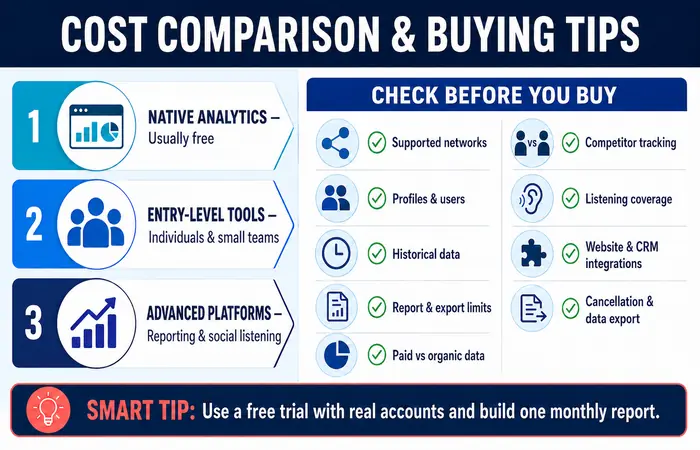
Native platform analytics are normally free. Entry-level cross-network tools may suit individuals and small teams, while advanced reporting and social listening platforms can cost substantially more.
Before purchasing, check:
- Supported social networks
- Number of profiles and users
- Historical data availability
- Reporting and export limits
- Paid versus organic reporting
- Competitor tracking
- Listening coverage
- Website and CRM integrations
- Cancellation and data-export terms
Use a free trial with actual accounts and prepare one real monthly report. This reveals usability and data gaps more effectively than a sales demonstration.
Final Recommendation by Use Case
Select native analytics or buffer for simple, economical reporting. Metricool might fit for those of you that are freelancers or even those businesses as soon as an office growing with reporting for clients. Use Hootsuite or Sprout Social for larger, multi-customer workflows with more comprehensive reporting features. Opt for Brandwatch once you want to take pleasure in deep client insights.
The correct system is exactly what may efficiently respond frequently, repetitive company worries and does not develop additional jobs for you personally report on these inquiries.
Frequently Asked Questions
What are social media analytics tools?
Social media analytics tools measure content, audience and campaign performance across social networks. They help marketers track relevant metrics, prepare reports and improve future decisions.
Which social media metrics matter most?
The right metrics depend on the objective. Reach may matter for awareness, while clicks, qualified leads, conversion rate and revenue are more useful for performance campaigns.
Are free analytics tools sufficient?
Native tools may be sufficient for a small business operating on one or two networks. Paid software becomes more useful when the team needs cross-channel comparisons, automation, competitor analysis or social listening.
Can these tools measure sales accurately?
They can support conversion measurement, but attribution remains imperfect. Customers may use multiple devices or interact with several channels before purchasing.
Conclusion
Social media analytics platforms make reporting repeatable and uncover trends in your audience, content and channel usage. But you also don’t want just another set of unused, unintuitive tools to navigate your work to them. By taking the right path to better measurement.
The key is to leverage existing capabilities first, develop the metrics that matter to your business, and invest in more advanced social media analytic tools for cross-channel insights if it makes sense for your business- not the company that has the rich product feature.
Marketing Analytics Resource Hub
Explore essential marketing analytics guides, tools and resources for measuring and improving marketing performance.
Marketing Analytics
A complete guide to measuring, analysing and improving marketing performance.
Social Media Analytics Tools
Measure audience growth, engagement and social media campaign results.
Free Marketing Analytics Tools
Explore free tools for tracking and analysing marketing performance.
AI Marketing Analytics Tools
Discover AI-powered tools for insights, forecasting and optimisation.
Content Marketing Analytics Tools
Evaluate content traffic, engagement, leads and conversions.
Email Marketing Analytics Tools
Track email delivery, clicks, conversions and subscriber behaviour.
Marketing Attribution Tools
Understand customer journeys and assign credit across marketing channels.
