
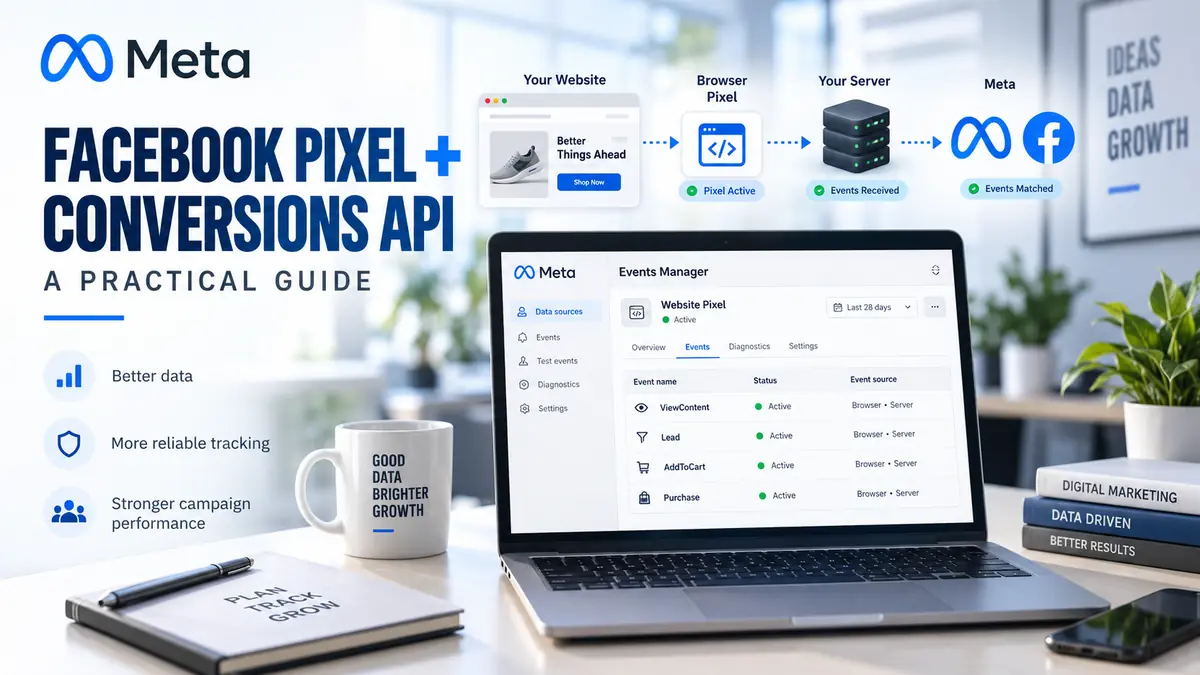

Using Facebook Pixel and Conversions API together can provide Meta with more reliable information about actions taken after someone views or clicks an advertisement. These actions can include viewing a product, adding an item to a basket, submitting a lead form or completing a purchase.
Table of Contents
This Article Is Part of the Facebook Marketing Resource Hub
Explore more guides, tutorials, strategies, and marketing resources inside our Marketing Resource Hub .
Neither tool guarantees accurate reporting automatically. Event selection, consent, data quality and testing all affect the results.
What Are the Meta Pixel and Conversions API?
The Meta Pixel is a piece of website code that records selected browser events. When a visitor completes an action, the browser can send information about that event to Meta.
Conversions API, commonly shortened to CAPI, creates a connection between a business’s server, customer-data platform or supported integration and Meta. It is not necessarily a replacement for the Pixel. Meta commonly recommends using browser and server events together where appropriate.
Facebook Pixel vs Conversions API
| Feature | Meta Pixel | Conversions API |
| Data source | Visitor’s browser | Server or connected platform |
| Setup method | Website code, tag manager or partner integration | Direct API, gateway or partner integration |
| Affected by browser restrictions | More likely | Less dependent on the browser |
| Technical difficulty | Low to moderate | Moderate to high |
| Real-time website activity | Supported | Supported when configured |
| Event deduplication | Required when the same event is also sent by CAPI | Required when paired with Pixel events |
Using both methods can improve data resilience, but it does not bypass privacy requirements or guarantee that every conversion will be attributed.
Facebook Pixel and Conversions API Guide
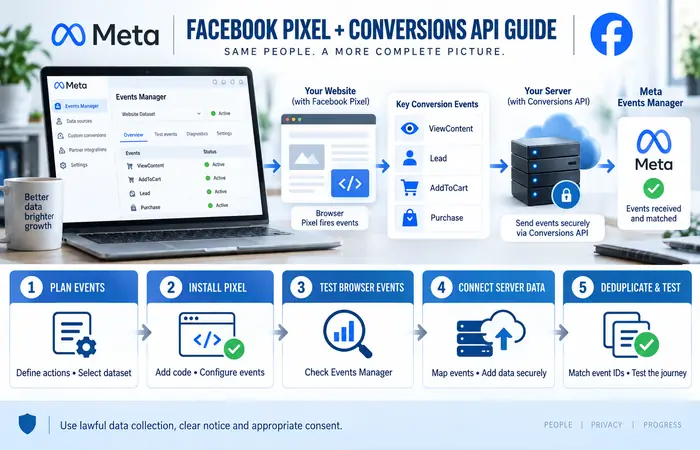
A practical implementation workflow is:
- Define the business actions that need to be measured.
- Create or select a dataset in Meta Events Manager.
- Install the Meta Pixel through website code, a tag manager or a partner integration.
- Configure standard events such as ViewContent, Lead, AddToCart or Purchase.
- Test browser events in Events Manager.
- Select an appropriate Conversions API setup method.
- Map server events to the corresponding browser events.
- Add suitable customer information parameters securely.
- Deduplicate matching browser and server events.
- Test the complete customer journey before using the data for optimisation.
Only collect and share information for which the business has a lawful basis and appropriate user notice or consent.
Facebook Pixel and Conversions API for Beginners
Beginners using platforms such as Shopify or WordPress should first investigate an official or reputable partner integration. These options can reduce the amount of custom development required.
Start with a few commercially meaningful events. For an online store, these may be product views, basket additions, checkout starts and purchases. A service business might focus on page views, contact-form submissions and qualified leads.
Avoid treating every button click as a conversion. Meta’s optimisation system needs events that represent genuine progress towards the business goal.
Best Facebook Pixel and Conversions API Setup
The best configuration is not necessarily the one sending the most data. It is the setup that sends accurate, consistent and privacy-compliant events.
Use the same event name and event_id for corresponding browser and server events. This allows Meta to recognise that the two signals describe one customer action rather than two separate conversions.
Event parameters should also be consistent. For example, a purchase event may include its value, currency and order identifier. Values should come from the completed transaction rather than an estimated basket total.
Facebook Pixel and Conversions API Cost
Meta does not normally charge a separate fee to create a Pixel or use the Conversions API. Implementation can still involve other expenses.
| Cost area | Possible expense |
| Meta Pixel creation | No standard Meta setup fee |
| Partner integration | Free or included with some platforms |
| Plugin or tracking tool | Free, subscription or licence fee |
| Developer implementation | One-time or ongoing professional fee |
| Server or cloud service | Hosting and processing charges |
| Maintenance | Testing after website or checkout changes |
A small website may use an existing integration, while a complex e-commerce business may require developers and server infrastructure.
Facebook Pixel and Conversions API Examples
Consider an online clothing shop. When a customer completes an order, the browser Pixel sends a Purchase event. The shop’s server sends the same purchase through CAPI with a matching event ID. Meta can then deduplicate the two records and count one purchase.
For a consultancy, the Pixel may record a submitted enquiry form. The server can later send a qualified-lead event when the business confirms that the enquiry meets its criteria. This helps separate basic submissions from genuinely useful leads.
Facebook Pixel and Conversions API Tips
Use Meta’s testing and diagnostic tools before launching conversion campaigns. Check for duplicate purchases, incorrect currencies, missing values and events that fire before an action is completed.
Other practical tips include:
- Keep a written event-measurement plan
- Use standard events where they match the action
- Protect access tokens and server credentials
- Exclude unnecessary personal information
- Review event match quality as a diagnostic indicator
- Retest tracking after website updates
- Compare Meta reporting with internal transaction records
Performance Expectations and Limitations
A combined Pixel and CAPI setup can reduce some measurement gaps caused by browser restrictions or connection problems. It cannot recover every missing event or create perfect attribution.
Meta’s reported conversions may differ from Google Analytics, a CRM or an e-commerce platform because each system uses different attribution rules, timestamps and identity signals. Use internal sales records as the primary source for confirmed revenue.
Frequently Asked Questions
Do Facebook Pixel and Conversions API perform the same function?
Both send events to Meta, but they use different connection methods. The Pixel operates in the browser, while CAPI sends data through a server or supported integration.
Can I use Conversions API without the Pixel?
Yes, server-only implementations are possible. However, using both may provide more complete signals when configured and deduplicated correctly.
Will Facebook Pixel and Conversions API duplicate purchases?
They can if matching events are not deduplicated. Use corresponding event names and event IDs for the same customer action.
Does CAPI bypass cookie consent or privacy law?
No. A server-side connection does not remove a business’s responsibility to provide appropriate notice, obtain consent where required and protect personal data.
Conclusion
The success of your Facebook Pixel and Conversions API integration depends on a well thought out measurement plan, correct event mapping, the secure transmission of data and proper deduplication. Use both Pixel and Conversions API where their respective business case is met. Test meticulously and contrast against actual leads and sales.
Facebook Ads Manager Hub
Explore our Facebook Ads Manager guides covering account setup, campaign creation, billing, conversion tracking and troubleshooting.
