



Facebook Ads Manager is the hub where companies produce and control every paid ad campaigned throughout the meta universe. Local business, eCommerce, professionals or expanding Indian businesses each platform provide control for your campaigns goals, target audience, budget, placements and reporting.
Table of Contents
This Article Is Part of the Facebook Marketing Resource Hub
Explore more guides, tutorials, strategies, and marketing resources inside our Marketing Resource Hub .
Its proper name is Meta Ads Manager. I still find I often search for it by its old name. I do have substantially more control than just “boosting a post” on Facebook or Instagram, which is good, but also makes the first few steps a little intimidating.
In this tutorial, we will walk you through end to end of the entire process:from sign-up to log-in into Facebook ads manager, creation of account structure, setup of campaigns, billing, implementation of the pixel and conversions api and finally troubleshoot common problems.
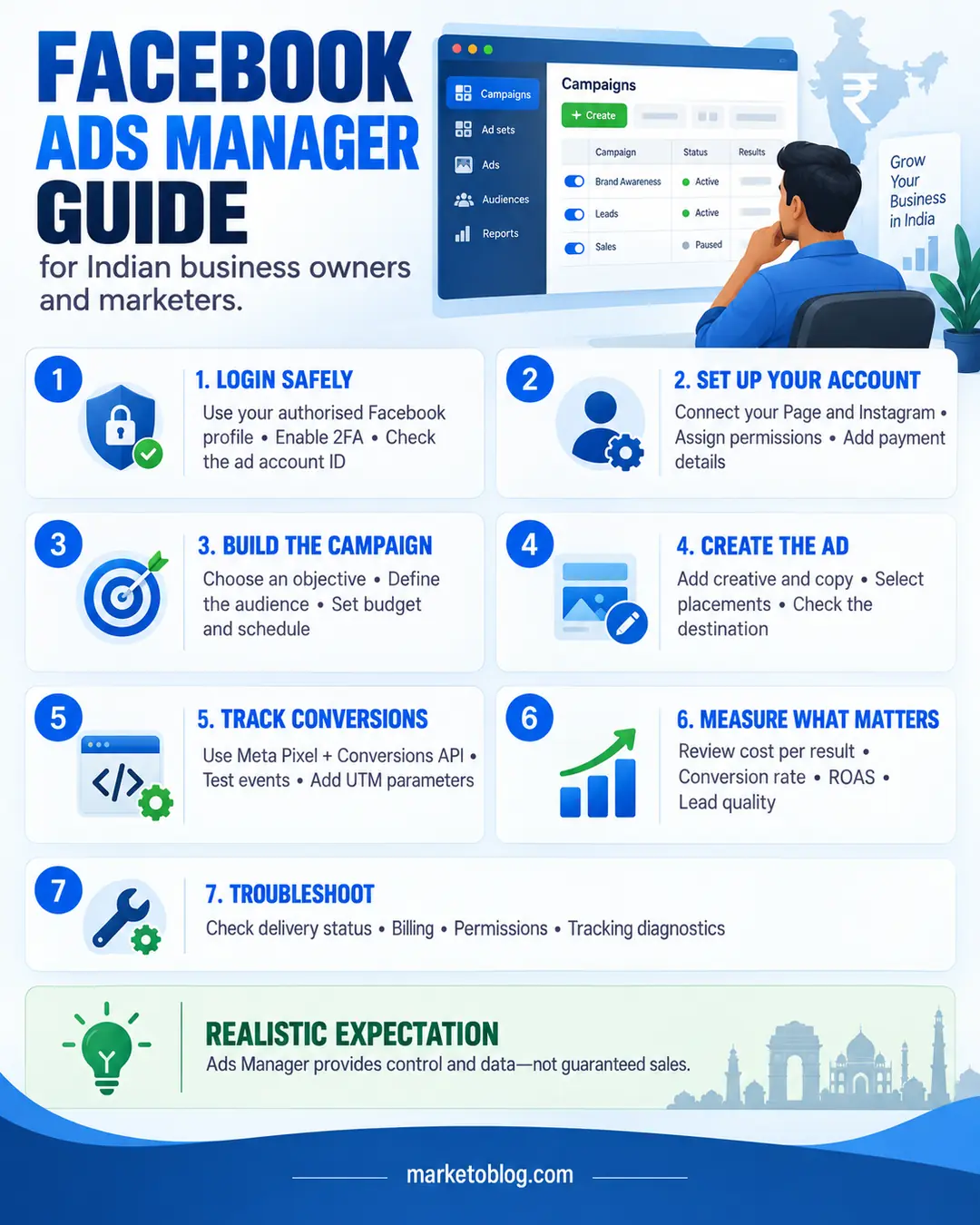
What Is Facebook Ads Manager?
Facebook Ads Manager is Meta’s integrated advertising tool. Advertisers can use the Facebook Ads Manager to develop, run campaigns, and measure delivery and success, across eligible Meta technologies.
A typical advertiser can use the platform to:
- Create campaigns based on a specific business objective
- Advertise on Facebook, Instagram and other eligible placements
- Define audiences by location, age, interests and behaviour
- Upload images, videos and advertising copy
- Set daily or lifetime budgets
- Schedule campaign start and end dates
- Install conversion-tracking tools
- Compare advertisements and audiences
- Review costs, conversions and delivery metrics
- Download advertising reports and billing receipts
Meta divides the advertisements into three levels. Campaign has objectives, ad set normally deals with audience, budget, schedule and placement, and creative material the audiences see are within ad. This structure is documented in the Meta Business Help Centre.
Facebook Ads Manager, Business Suite and Boosted Posts Compared
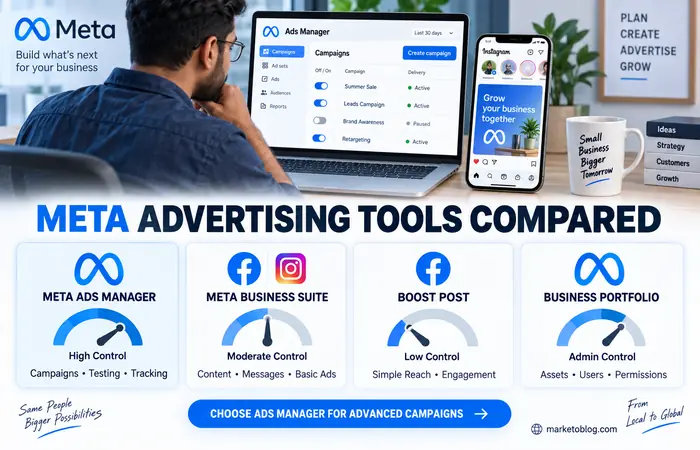
These Meta tools sometimes overlap, but they are designed for different levels of work.
| Tool | Main purpose | Level of control | Best suited to | Main limitation |
| Meta Ads Manager | Creating, managing and measuring advertising campaigns | High | Advertisers, agencies and businesses running structured campaigns | Requires time to learn |
| Meta Business Suite | Managing business content, messages and basic advertising tasks | Moderate | Small businesses handling Facebook and Instagram together | Fewer advanced campaign controls |
| Boost Post | Promoting an existing Facebook or Instagram post | Low | Simple awareness or engagement promotions | Limited optimisation, testing and reporting options |
| Meta Business Portfolio | Organising business assets, users and permissions | Administrative | Teams, agencies and businesses with several assets | It does not replace Ads Manager for campaign creation |
Boosted Post has its uses when a specific simple action is to be taken such as the spread of a notification. Ads Manager should be utilized when the business requires conversion tracking, various types of advertisements, testing a wide variety of target markets, or to manage budgets within limits.
Facebook Ads Manager Login: How to Access the Platform Safely
The standard Facebook Ads Manager login uses the personal Facebook profile connected to your business assets. Businesses do not normally create a separate shared login for the advertising platform.
To access your account:
- Visit Meta Ads Manager through an official facebook.com or business.facebook.com address.
- Sign in using the Facebook profile that has permission to access the relevant Page and ad account.
- Complete two-factor authentication if requested.
- Open the account selector and confirm that you are viewing the correct ad account.
- Check the displayed ad account ID before changing budgets, campaigns or payment settings.
If you manage more than one client or company, similar account names can cause mistakes. Match the account name with its numerical ID before publishing an advertisement or adding a payment method.
Avoid using login links received through unexpected emails, direct messages or WhatsApp messages. Phishing pages can closely copy Meta’s login screen. Enter your details only on a verified Meta or Facebook domain, and enable two-factor authentication. Meta provides official instructions for setting up and using two-factor authentication.
Giving Team Members Access
Do not provide employees, freelancers or agencies with your personal Facebook password. Add each person through the appropriate business settings and assign only the permissions required for their role.
For example:
- An analyst may only need permission to view performance.
- A media buyer may require campaign creation and editing access.
- A finance team member may need billing information.
- An agency administrator may require broader asset management access.
You should review who has access on an ongoing basis and delete former employees from systems. Limiting what people can access has the benefit of increasing accountability for change to being linked to a person rather than ‘someone’.
Facebook Ads Account Setup for Indian Businesses
Before running a campaign, organise the main business assets. Depending on the campaign, these may include a Facebook Page, Instagram account, ad account, website domain, dataset or Meta Pixel and payment method.
Meta states that a business needs a Facebook Page—or an appropriate role on another Page—to create its first ad account. The current process is explained in Meta’s official ad account setup guide.
Step-by-Step Account Setup Workflow
Create or select a Facebook Page.
Use the genuine name and details of the business. Complete the profile, contact information and website fields where relevant.
Create a Meta business portfolio.
This helps organise Pages, Instagram profiles, ad accounts, data sources and team permissions.
Add or create an ad account.
Choose the correct time zone and currency carefully. These settings affect reporting and billing and may be difficult to change later.
Connect the Facebook Page and Instagram account.
Confirm that the business owns or is authorised to manage both assets.
Assign user permissions.
Give each team member only the access needed for their responsibilities.
Add a payment method.
Use a valid method supported for the account’s billing country and currency.
Configure tracking.
Ecommerce and lead-generation advertisers should set up relevant website or app events before launching conversion-focused campaigns.
Review business information.
Make sure the legal name, address, tax information and billing details are accurate where the account requests them.
Secure every administrator account.
Use unique passwords and two-factor authentication.
Payment methods and features can vary according to the ad account’s country, currency and billing arrangement. Confirm the available options inside the account rather than assuming that every internationally listed method will appear in India.
Understanding the Campaign Structure
Every campaign is divided into three levels.
| Level | What you normally control | Practical example |
| Campaign | Objective and selected campaign-level settings | Generate qualified enquiries |
| Ad set | Audience, schedule, placements, optimisation and some budget settings | Adults in Mumbai are interested in a relevant service |
| Ad | Image or video, primary text, headline, destination and call to action | A short customer-problem video leading to a landing page |
This structure allows one objective to contain several audience or creative tests. However, separating the account into too many small ad sets can spread a limited budget too thinly.
A small Indian business may begin with one campaign, one or two carefully defined ad sets and a small number of genuinely different creatives. This is usually easier to interpret than launching many combinations without enough budget to gather meaningful data.
Facebook Ads Campaign Setup: Complete Workflow
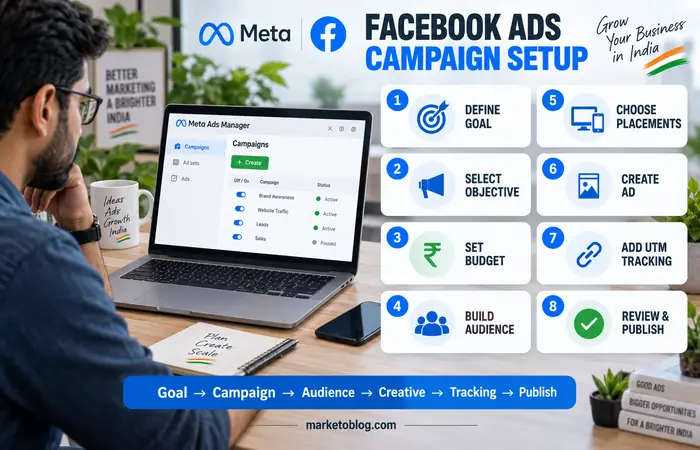
A useful campaign starts with a business result, not with the desire to gain impressions at the lowest possible cost.
1. Define the Conversion Goal
Choose one primary action, such as:
- Completing a website purchase
- Submitting a lead form
- Starting a WhatsApp or Instagram conversation
- Calling the business
- Installing an application
- Visiting a landing page
- Watching an important video
- Increasing awareness in a defined local area
The selected objective tells Meta what type of result to prioritise. Available objectives commonly include awareness, traffic, engagement, leads, app promotion and sales. Meta’s objective selection guidance recommends matching the objective to the business outcome rather than simply selecting the cheapest result.
2. Select the Campaign Objective
Open Ads Manager, select Create, choose the appropriate buying option if presented, and select the campaign objective. Meta’s campaign creation workflow may change over time, but its official instructions begin with these core choices in Ads Manager.
Use clear campaign names. A practical format is:
Objective | Product | Location | Month
For example:
Leads | Home Loan Consultation | Mumbai | September
3. Configure Budget and Schedule
Depending on the options available, the budget may be controlled at campaign or ad-set level.
A daily budget limits the average amount intended for each day, while a lifetime budget distributes spending across a defined schedule. Actual charging and daily delivery can vary according to Meta’s billing and pacing systems.
Do not set a budget solely because a competitor claims that a particular daily amount works. Suitable spending depends on:
- Audience size
- Competition
- Campaign objective
- Conversion rate
- Product price
- Profit margin
- Sales process
- Location
- Advertising quality
- Historical account data
For a new campaign, choose a controlled test budget that the business can afford to lose while gathering information.
4. Build the Audience
Audience controls may include location, age, language, interests, existing customer data and people who previously interacted with the business.
For an Indian campaign, location selection needs particular attention. A business serving only Pune should not automatically target the whole country. Likewise, a national ecommerce company should check whether it can deliver reliably to every selected location.
Avoid defining an audience so narrowly that delivery becomes difficult. On the other hand, broad targeting cannot correct a weak offer or an unclear advertisement.
5. Choose Placements
Meta could automatically distribute the ads in placements that fit, or you can select them manually. These could be the Facebook feed, stories, reels, Instagram feed or stories and reels, messenger and any other supported surface (this can vary from campaign to campaign).
Automatic placements can give the delivery system more opportunities to find results. Manual placement selection may be useful when the creative or business requirement genuinely applies to a particular environment.
Prepare creative material in appropriate formats. A horizontal image designed for a website banner may be difficult to read in a vertical Story or Reel.
6. Create the Advertisement
Add the Page identity, Instagram account, format, media, primary text, headline, destination and call-to-action button.
A useful advertisement should quickly communicate:
- Who the offer is for
- What problem it addresses
- What the user receives
- Why the claim is credible
- What action the person should take
- Any important price, eligibility or location condition
Do not use misleading claims, fabricated scarcity or unclear pricing. Before publication, inspect the mobile and desktop previews and test the destination page.
7. Add Tracking Parameters
Use consistent UTM parameters when sending visitors to a website. These parameters allow traffic to be analysed in web analytics tools rather than relying on one advertising dashboard.
A simple structure might be:
utm_source=facebook
utm_medium=paid_social
utm_campaign=home_loan_leads
Keep naming conventions consistent across campaigns.
8. Review and Publish
Before publishing, check:
- Campaign objective
- Conversion location
- Audience location
- Budget and schedule
- Page and Instagram identity
- Destination URL
- Tracking event
- Creative cropping
- Spelling and offer conditions
- Payment method
Meta automatically reviews new and edited advertisements. Advertisers can monitor the status in the Delivery column, as explained in Meta’s guidance on advertisements under review.
Facebook Ads Billing and Payments in India
Billing arrangements depend on the ad account and payment settings. Meta describes two main approaches: automatic billing, where charges are made after reaching a payment threshold or billing date, and available-funds arrangements, where money is added before advertisements run. The precise option shown depends on the account. See Meta’s explanation of how advertising charges work.
Billing Checks Before Launch
Confirm the following:
- Ad account currency
- Billing country
- Primary payment method
- Backup payment method, if supported
- Account spending limit
- Campaign or ad-set budget
- Tax and business details
- Outstanding balance
- Payment threshold or available balance
India-specific banking controls, recurring-payment requirements and issuer restrictions can affect transactions. A payment method that works for ordinary online shopping may still reject an advertising charge.
Meta notes that some Indian advertisers may need to add funds through supported local methods after a failed recurring payment. Follow the instructions shown in the account and Meta’s current failed-payment guidance for advertisers.
Where to Find Receipts
Open Billing & payments, choose the correct ad account and select the relevant date range. Meta allows advertisers to view payment activity and download receipts for individual charges or a selected period through its receipt-management section.
Keep monthly copies for bookkeeping. The amount charged to a card may represent accumulated advertising spend rather than the cost of one campaign.
Facebook Pixel and Conversions API
The Meta Pixel is website code that records selected visitor actions, such as viewing a product, adding an item to a basket, submitting a lead or completing a purchase. Meta describes it as a tool for measuring advertising effectiveness by understanding actions taken on a website. Learn how the Meta Pixel works.
Conversions API creates a more direct connection between a business’s marketing data and Meta’s systems. It can send events from a server, website platform, customer relationship system or other approved integration. Meta recommends using it alongside the Pixel rather than treating the two as automatic substitutes. Read Meta’s Conversions API overview.
Tracking Setup Workflow
- Create or select the appropriate dataset or Pixel.
- Install the browser Pixel manually, through a partner integration or with a tag manager.
- Define standard events that match genuine user actions.
- Add event value and currency where appropriate.
- Configure Conversions API through a supported partner, gateway or developer implementation.
- Use matching event IDs to prevent browser and server versions of the same action from being counted twice.
- Test events before spending on a conversion campaign.
- Review event quality and diagnostics regularly.
- Confirm that the implementation follows applicable privacy and consent requirements.
Do not mark an ordinary page view as a purchase or lead. Incorrect events train the system towards the wrong behaviour and make campaign reporting unreliable.
Businesses should also avoid sending data that they do not have the right to collect or use. Tracking technology must be implemented in accordance with applicable privacy rules, consent requirements and Meta’s terms.
Content Categories and Main Navigation Areas
Ads Manager is primarily an operational platform rather than a publishing website. Its navigation is organised around advertising tasks.
Common areas include:
- Campaigns, ad sets and advertisements
- Account overview
- Audiences
- Events Manager
- Commerce and catalogue tools
- Billing and payments
- Advertising reporting
- Brand safety controls
- Business settings
- Account quality and support
The exact navigation can vary by account type, assigned permissions, connected assets and interface updates. If a menu mentioned in a tutorial is missing, use Meta’s search function or All tools menu and confirm that you have the required access.
How to Read Campaign Performance
Avoid judging an advertisement from one metric. A high click-through rate can look positive, but it means little if those visitors do not complete the desired action.
| Metric | What it indicates | Important limitation |
| Reach | Number of people shown the advertisement | Does not show whether people paid attention |
| Impressions | Total advertisement displays | One person may generate several impressions |
| CPM | Cost per 1,000 impressions | A low CPM does not guarantee useful traffic |
| Link CTR | Percentage of impressions producing link clicks | Clicks may not become customers |
| CPC | Average cost per link click | Cheap clicks may be low quality |
| Conversion rate | Share of visitors completing an action | Depends on tracking accuracy and landing-page quality |
| Cost per result | Average cost for the selected result | The definition of “result” varies by objective |
| ROAS | Tracked revenue divided by advertising spend | Does not automatically include product, staff or fulfilment costs |
| Frequency | Average number of times each person saw the advertisement | Rising frequency may indicate creative fatigue, depending on context |
Compare advertising data with website analytics, CRM records, qualified leads, completed orders and actual profit. Platform-reported conversions can differ from another analytics tool because attribution rules and measurement methods are not identical.
Realistic Performance Expectations
Facebook Ads Manager is an advertising tool, not a guarantee of enquiries or sales. Results depend on the offer, creative quality, audience, website experience, sales follow-up, competition, budget and tracking accuracy.
New campaigns may need time and sufficient conversion activity before performance becomes stable. Constant editing can make it harder to understand whether a strategy is working.
Reasonable expectations include:
- Initial campaigns may primarily reveal which messages do not connect.
- A profitable campaign can become more expensive as competition changes.
- A low cost per lead is not valuable if most leads are unqualified.
- Small budgets can test a focused idea but may not support many audiences simultaneously.
- Tracking will rarely be perfectly identical across every platform.
- Strong creative and landing pages still matter when automated targeting is used.
- Historical results do not guarantee future performance.
Before increasing spending, check lead quality, fulfilment capacity, profit margin and the business’s ability to follow up promptly.
Trustworthiness and Platform Legitimacy
Meta Ads Manager is Meta’s official advertising platform. The legitimate service is accessed through Meta-controlled Facebook and business domains.
But it’s not to say that the presence of the official platform does not guarantee the authenticity of any advertisement, consultant, or support message. Risks may exist with phishing links, falsified reports for terms-of-service violation, impersonating support accounts and a request to invite to new admins
Protect the account by:
- Enabling two-factor authentication
- Using unique personal logins for each user
- Checking URLs before entering credentials
- Limiting administrative permissions
- Reviewing unfamiliar users and connected applications
- Keeping payment information current
- Avoiding remote-access requests from unverified people
- Checking alerts directly inside the official account
Who Should Use Facebook Ads Manager?
The platform may be suitable for:
- Ecommerce businesses measuring online purchases
- Local businesses promoting calls, messages or appointments
- B2B companies collecting qualified leads
- Applications seeking installations or in-app actions
- Education providers advertising genuine courses
- Content businesses building reach or engagement
- Agencies managing approved client accounts
- Brands retargeting consenting website visitors or customers
It is particularly useful when the business has a defined offer, suitable creative assets, a functioning destination and a clear way to measure results.
Who May Need a Different Approach?
Ads Manager may not be the immediate priority for a business that:
- Has not defined its customer or offer
- Cannot respond to enquiries
- Has a slow or broken website
- Has no margin available for paid acquisition
- Operates in a restricted advertising category without understanding the rules
- Cannot provide evidence for its claims
- Expects guaranteed sales from a very small test
- Lacks appropriate tracking and privacy processes
Such businesses may benefit from resolving those fundamentals before committing a significant advertising budget.
Facebook Ads Manager Troubleshooting
Unable to Log In
Confirm that you are using the correct personal Facebook profile. Reset the password only through Facebook’s official recovery process. If two-factor authentication is causing the problem, use saved recovery codes, a recognised device or Meta’s official two-factor authentication troubleshooting guidance.
Ad Account Is Missing
Open the account selector and search for the account ID. If it remains unavailable, ask the business administrator to check your assigned permissions. Access to a Facebook Page does not always provide access to its associated ad account.
Advertisement Is Not Delivering
Review:
- Campaign, ad set and advertisement toggles
- Start and end dates
- Payment status
- Account spending limit
- Audience size
- Bid or cost controls
- Review status
- Policy notifications
- Available budget
A campaign may also show limited delivery when the audience, budget or optimisation event gives the system too few opportunities.
Payment Failed
Check the available balance, card expiry date, bank authorisation and outstanding amount. Select the correct account in Billing & payments and follow the displayed repayment steps. Do not repeatedly add unfamiliar payment methods without understanding why the original transaction failed.
Pixel Is Not Recording Events
Confirm that the correct Pixel or dataset ID is installed. Test the website in Events Manager, review browser or consent restrictions, check whether the event fires on the correct action and inspect diagnostics.
For Pixel and Conversions API used together, deduplicate matching browser and server events. Otherwise, one customer action may be recorded twice. Meta provides specific guidance on Pixel and Conversions API event deduplication.
Results Suddenly Declined
Do not assume that one platform error is responsible. Compare:
- Date range and attribution settings
- Tracking changes
- Website performance
- Product availability
- Audience saturation
- Creative frequency
- Competitor activity
- Seasonal demand
- Sales-team response time
Change one major variable at a time where practical. This makes the results easier to interpret.
Practical Use-Case Examples
Local Service Business
A dental clinic in Bengaluru could run a leads campaign for a specific consultation, restrict the location to its realistic service area and route enquiries to a form or messaging channel. The clinic should describe eligibility and pricing carefully rather than promising a clinical outcome.
Ecommerce Store
An Indian clothing store could use a sales campaign with product-page, basket and purchase events. It may compare vertical video demonstrations with catalogue-based advertisements and evaluate contribution margin, not only reported return on advertising spend.
B2B Company
A software provider could offer a useful industry guide through a lead form. Its sales team should distinguish qualified decision-makers from low-intent downloads before judging campaign success.
Content Publisher
A marketing website could promote a strong educational resource to a relevant audience. It should measure engaged visits, newsletter registrations and returning readers rather than treating every inexpensive click as equal.
Topic Clusters Covered by the Platform
A complete learning plan for Ads Manager can be divided into these topic clusters:
- Facebook Ads Manager login and account security
- Facebook ads account setup
- Facebook ads campaign setup
- Audience research and targeting
- Creative formats and placements
- Facebook ads billing and payments
- Meta Pixel and Conversions API
- Campaign reporting and attribution
- Advertising policies and account quality
- Facebook Ads Manager troubleshooting
Each topic supports a different stage of the advertising workflow. Beginners should master account security, campaign structure and measurement before exploring complex automation.
Frequently Asked Questions
Is Facebook Ads Manager free to use?
Creating an account and accessing Ads Manager does not normally require a platform subscription. The business pays for the advertising it runs and may separately pay agencies, creative professionals, software providers or technical specialists.
Is Facebook Ads Manager now called Meta Ads Manager?
Yes. Meta Ads Manager is the current official name, although “Facebook Ads Manager” remains widely used because the platform originally focused on Facebook advertising.
How do I complete the Facebook Ads Manager login?
Sign in to the Facebook profile that has access to the relevant business and ad account, then open Ads Manager through an official Meta or Facebook domain. Select the correct ad account and complete two-factor authentication when required.
Can I advertise on Instagram from Facebook Ads Manager?
Yes. An eligible Instagram account can be connected to the business and selected as an advertising identity. Campaign placements and format requirements depend on the chosen objective and account configuration.
What budget should a beginner use in India?
There is no universal daily amount. Start with a controlled amount based on the cost of the product, expected conversion rate, audience size and acceptable acquisition cost. Use the first test to collect evidence rather than expecting immediate scale.
What is the difference between Meta Pixel and Conversions API?
The Pixel generally sends browser-based website events, while Conversions API can send events through a server or connected business system. They can work together, provided matching events are correctly deduplicated.
Why has my advertisement been rejected?
Possible reasons include prohibited content, restricted categories, misleading claims, inappropriate creative material, destination-page problems or missing disclosures. Read the specific notification and compare the entire advertisement and landing page with the applicable policy.
Can an agency manage my account without my password?
Yes. Give the agency or its individual team members the required permissions through the business settings. Never share your personal Facebook password.
Does a high ROAS always mean the campaign is profitable?
No. Platform-reported ROAS compares attributed revenue with advertising spend. It may not include product cost, tax, delivery, refunds, agency fees, discounts or employee time.
Conclusion
Facebook Ads Manager provides a high degree of command over business advertising on Facebook, Instagram and other viable Meta locations for Indian businesses. Among its greatest values are not audience targeting and campaign creating itself, but: linking business aims, testing advertising ideas, controlled expenditure and observable customer activity.
Start with a protected login to Facebook Ads Manager and one properly set-up ad account with one designated campaign objective. Ensure your billing and conversion tracking have been set-up prior to any significant spend. Then measure success through the leads generated/sale finalized, and profit, rather than individual metrics on the platform itself. As the interface evolves, rigid workflow and expectations have to stay.
Facebook Ads Manager Hub
Explore our Facebook Ads Manager guides covering account setup, campaign creation, billing, conversion tracking and troubleshooting.
