

In Facebook Ads Manager Login businesses, agencies and advertisers use this login section to manage your Meta ads account. You don’t typically require a different password for your Ads Manager – it generally syncs up with the Facebook account linked to your Page, Business Suite, or ad account.
Table of Contents
This Article Is Part of the Facebook Marketing Resource Hub
Explore more guides, tutorials, strategies, and marketing resources inside our Marketing Resource Hub .
Login to your account might be extremely simple; however, we also could get into a state with wrong chosen account, absence of some permissions or request for 2FA or advertisement limits. This instruction helps you to perform a secure login process and fix all basic issues with signing in.
What Is Facebook Ads Manager?
Facebook Ads Manager, better known as Meta Ads Manager, is your central hub for creating and managing your advertisements throughout Facebook, Instagram, Messenger and any other applicable Meta placements.
Advertisers can use it to:
- Create campaigns, ad sets and advertisements
- Select audiences and placements
- Set daily or lifetime budgets
- Upload advertising creatives
- Monitor reach, clicks and conversions
- Manage billing and payment methods
- Compare campaign results
If a campaign needs monitoring when the user is not able to log in to the laptop, they are using to access the meta service a mobile application exists that will allow monitoring and in fact modifying the campaigns running-performance, notifications etc., and can flip between different advertiser accounts. (Google Play listing)
Who Can Use Ads Manager?
Ads Manager can be used by people that own a Page, small business, a team of marketers, a freelancer or an agency. Still you do not get an advertising account automatically after signing in.
Your Facebook profile must have suitable permission for the relevant Page, business portfolio or ad account. Agencies should receive partner or user access instead of asking clients to share passwords.
Facebook Ads Manager Login Workflow
Follow these steps to open your advertising dashboard:
- Visit the official Meta Ads Manager page.
- Enter the email address or phone number linked to your Facebook account.
- Enter your Facebook password.
- Complete two-factor authentication if requested.
- Select the correct business portfolio and advertising account.
- Check the account name and ID before editing a campaign.
Bookmark the official page after confirming the domain. Avoid signing in through unfamiliar advertisements, emails or shortened links.
Facebook Ads Manager Login Problems and Solutions
| Login problem | Likely reason | Recommended action |
| Incorrect password | Outdated or mistyped credentials | Use Facebook’s official account-recovery option |
| Ad account is missing | Wrong profile or insufficient access | Ask an administrator to review your permissions |
| Verification code not received | Authentication method is unavailable | Check the registered device and recovery options |
| Account is restricted | Security, payment or policy review | Open Account Quality and follow the displayed process |
| Blank or continuously loading page | Browser data or extension conflict | Clear site data or try an updated browser |
| Wrong ad account opens | Several accounts are connected | Use the account selector and verify the account ID |
Do not repeatedly submit passwords or verification codes if an unexpected page appears. Close the page and manually enter Facebook’s official address.
Services Available After Login
Once access is confirmed, users can create campaigns, define audiences, choose placements, control spending and review results. Billing, Events Manager, audience tools and business settings may open in separate parts of Meta’s business interface.
Available features depend on the user’s permission level, account history, business verification status and current Meta product configuration.
Ads Manager vs Other Meta Advertising Options
| Option | Best use | Control level | Main limitation |
| Meta Ads Manager | Structured campaigns and detailed reporting | High | Requires more learning |
| Meta Business Suite | Content, messages and basic advertising | Moderate | Fewer advanced controls |
| Boost Post | Quickly promoting an existing post | Low | Limited testing and optimisation |
| Ads Manager mobile app | Monitoring campaigns while travelling | Moderate | Complex setup is easier on desktop |
Ads Manager is generally the better choice when a business needs detailed audience controls, conversion tracking or multiple campaigns.
Is Facebook Ads Manager Login Safe and Legitimate?
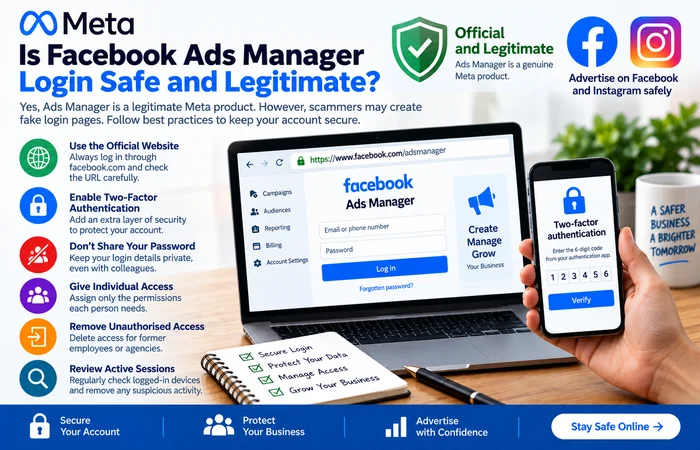
Ads Manager is a legitimate Meta product; however criminals may create false login pages for it. You will want to verify that the address redirects to facebook.com and do not share passwords with co-workers, plus have two authentication factors enabled.
Businesses should assign individual access with only the permissions each person needs. Remove former employees or agencies promptly and review active sessions if suspicious activity appears.
Supported Devices and Practical Expectations
Ads Manager works through current desktop browsers and Meta’s official mobile application. Desktop access is usually more convenient for building campaigns, reviewing large reports and changing detailed settings. Mobile access is useful for alerts, basic edits and performance checks.
Logging in does not guarantee that advertising will be available immediately. New accounts may require identity, payment or business verification. Meta can also limit accounts while reviewing unusual activity or potential policy violations.
Frequently Asked Questions
Can I complete the Facebook Ads Manager login without a Facebook account?
Usually, a verified Facebook identity is necessary. Your personal profile should be able to access the business account concerned or portfolio.
Why can I log in but cannot see my ad account?
You may be logged into the incorrect Facebook profile, or your permissions may not be set correctly. Please ask the administrator to review their permissions and to ensure the correct ad account ID is displayed.
Is there a separate Ads Manager password?
No separate password is normally required. Ads Manager uses the credentials and security settings associated with your Facebook account.
Conclusion
When logging in to Facebook Ads Manager, you must have a legitimate Facebook profile, be given correct business permissions and have two-factor authentication enabled (if applicable). Make sure you are on Meta’s official website. Also, check the business account that is selected and look for unauthorized access attempts before altering campaign plans or payment information.
Facebook Ads Manager Hub
Explore our Facebook Ads Manager guides covering account setup, campaign creation, billing, conversion tracking and troubleshooting.
