

A correct Facebook Ads account setup gives your business a secure foundation for advertising on Facebook and Instagram. Before launching campaigns, you should organise your Page, business details, user permissions, billing method and tracking assets.
Table of Contents
This Article Is Part of the Facebook Marketing Resource Hub
Explore more guides, tutorials, strategies, and marketing resources inside our Marketing Resource Hub .
The process does not require advanced technical knowledge, but some settings—particularly currency and time zone—should be checked carefully because they may be difficult to change later.
What Is a Facebook Ads Account?
A Facebook ads account is the central area where businesses create advertising campaigns, allocate their spending budget, set up payment information, and observe their performance data. Business are able to access their accounts through Facebook Ads Manager and link their portfolio, FB Page, IG Profile, and website data source.
The normal structure is:
| Level | Main purpose | Example |
| Business portfolio | Organises people and business assets | An Indian clothing company |
| Ad account | Controls advertising, billing and reporting | Clothing Brand India Ads |
| Campaign | Defines the advertising objective | Website Sales |
| Ad set | Controls audience, budget and placements | Women aged 25–40 |
| Advertisement | Contains the creative and message | Product video advertisement |
Facebook Ads Account Setup Guide
Use the following workflow to create and prepare an account:
- Sign in to the Facebook profile used to manage your business.
- Visit the official Meta Business tools page.
- Create a business portfolio using your real business name and email address.
- Add your existing Facebook Page or create a new Page.
- Open Business Settings and create an advertising account.
- Choose the correct country, time zone and billing currency.
- Assign access to employees, partners or agencies.
- Add an accepted payment method.
- Connect your Instagram account where relevant.
- Enable two-factor authentication before advertising.
Use accurate business information. Inconsistent names, unauthorised payment methods or frequent access from unfamiliar locations can lead to additional security checks.
Facebook Ads Account Setup for Beginners
Beginners should start with one business portfolio and one primary advertising account. Creating several accounts without a clear operational need can make billing, access and reporting unnecessarily complicated.
Before your first campaign, prepare:
- A complete Facebook Page
- A clear campaign goal
- Approved images or videos
- Website or landing-page access
- A defined daily test budget
- A privacy policy where customer data is collected
- A secure payment method
Website-based campaigns may also require the Meta Pixel or another supported data connection. Allow time to test events before relying on conversion reporting.
Best Facebook Ads Account Setup Practices
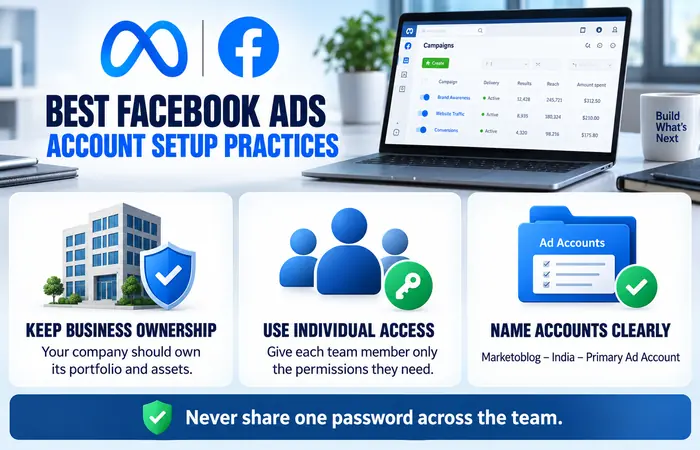
The best setup depends on how the business operates, but ownership should remain with the business itself. A company should create and control its business portfolio rather than allowing an outside freelancer to own its main assets.
Give each team member an individual login and only the permissions required for their work. Do not share one Facebook password between several people.
Use a consistent naming structure, such as:
Marketoblog – India – Primary Ad Account
This makes the correct account easier to identify when a user manages multiple brands or clients.
Facebook Ads Account Setup Cost in India
Creating a Facebook Page, business portfolio and advertising account does not normally carry a separate setup charge from Meta. The primary expense is the advertising budget deposited or charged when campaigns run.
Additional costs may include:
| Expense | Typical requirement |
| Meta account creation | No standard creation fee |
| Advertising spend | Set by the advertiser |
| Creative production | Optional |
| Agency or freelancer fee | Optional |
| Landing-page development | Optional |
| Analytics or creative software | Optional |
Taxes and billing treatment can depend on the advertiser’s location, business details and current regulations. Review the amounts shown inside Meta’s billing interface and consult an Indian tax professional when necessary.
Facebook Ads Account Setup Examples
A local restaurant might connect one Page, one Instagram account and one ad account to promote bookings within a limited radius.
An e-commerce business may use the same basic structure but also connect a product catalogue, website dataset and verified domain. An agency handling several clients should keep each client’s assets separate and obtain authorised partner access.
These examples show why copying another company’s setup without considering ownership and reporting requirements can cause problems.
Facebook Ads Account Setup Tips and Limitations
Useful setup tips include enabling two-factor authentication, adding a backup administrator and documenting account IDs. Review user access whenever an employee or agency relationship ends.
New accounts should have realistic expectations. Completing the setup does not guarantee advertisement approval, low costs or immediate sales. Meta may review business information, payment activity, advertising content and landing pages. Performance also depends on the offer, audience, creative quality and tracking accuracy.
Frequently Asked Questions
Is Facebook Ads account setup free?
Meta does not usually charge a separate fee to create an advertising account. You pay when advertisements run, while optional agencies, design and website costs are separate.
Do I need a Facebook Page to advertise?
A Facebook Page is generally required to represent the business in advertisements. An Instagram account can also be connected for relevant placements and identity options.
Can an agency complete my Facebook Ads account setup?
Yes, but the business should retain ownership of its Page, ad account and other primary assets. Give the agency authorised access instead of sharing personal login credentials.
Why can’t I create another advertising account?
Meta may limit account creation based on business history, security status or existing assets. Check Business Settings and Account Quality for available guidance.
Conclusion
A reliable Facebook Ads account setup starts with accurate business information, clear asset ownership, restricted user permissions and secure billing. Once these foundations are ready, you can create campaigns without confusing account access or reporting across different businesses.
Facebook Ads Manager Hub
Explore our Facebook Ads Manager guides covering account setup, campaign creation, billing, conversion tracking and troubleshooting.
