



YouTube ads deliver your messages to people as they view and research video content or scroll through YouTube Shorts and feeds. Unlike traditional tv, YouTube campaigns can target by demographics (location, interests, etc.) content, and previous interactions with your business.
Table of Contents
This Article Is Part of the Youtube Marketing Resource Hub
Explore more guides, tutorials, strategies, and marketing resources inside our Youtube Marketing Resource Hub .
That’s the thing, just being able to reach such a wide audience won’t necessarily produce profit. Your campaign’s results are tied down to its offer, the quality of its video, targeting, bid, user experience and set up.
In this guide, we will learn about the most important types of YouTube Ads, the cost we can expect in India, the necessary technical and logistical setup and how to build and optimize campaigns in a real, practical manner for small businesses, marketing teams, creators and advertisers who desire to have an actual and honest picture of the platform before investing their resources on it.
What Are YouTube Ads?
YouTube Ads are ads delivered through Google Ads on YouTube as well as, in some campaign settings, on eligible Google video partner websites and apps.
Although video is the primary creative format, a campaign may also use supporting elements such as:
- A business name
- Logo
- Headline
- Description
- Call-to-action button
- Website URL
- Product feed
- Companion banner
Advertisers select an objective, upload or link their video, define the audience, choose geographical locations and set a budget. Google’s advertising system includes eligible ads in real-time auction.
The winner of an auction isn’t necessarily based on bid price. Relevance, expected response, ad quality, campaign settings and competition play roles in ad delivery. Where can YouTube, advertisements appear?
Depending on the format and campaign type, an advertisement may appear:
- Before, during or after another YouTube video
- In YouTube search results
- On the YouTube Home feed
- Alongside related content
- In the Shorts feed
- On eligible Google video partner websites and applications
- On connected television devices
Placement availability can vary by campaign objective, format and account eligibility.
How YouTube Advertising Works
YouTube advertising operates through an automated auction within Google Ads. When a user creates an eligible ad opportunity, Google evaluates potential advertisements based on their targeting, bid, budget and predicted relevance.
A simplified process looks like this:
- The advertiser chooses a business objective.
- The advertiser supplies one or more video creatives.
- Audience, content and location settings are applied.
- A daily or total campaign budget is selected.
- Google identifies eligible opportunities.
- The advertisement enters an auction.
- Delivery and interactions are recorded in Google Ads.
- The system uses available performance data to adjust delivery.
The billing event depends on the format and bidding strategy. An advertiser might pay for a view, one thousand impressions, a click or conversion-focused delivery.
This means that “YouTube advertising cost” cannot be expressed as one universal price.
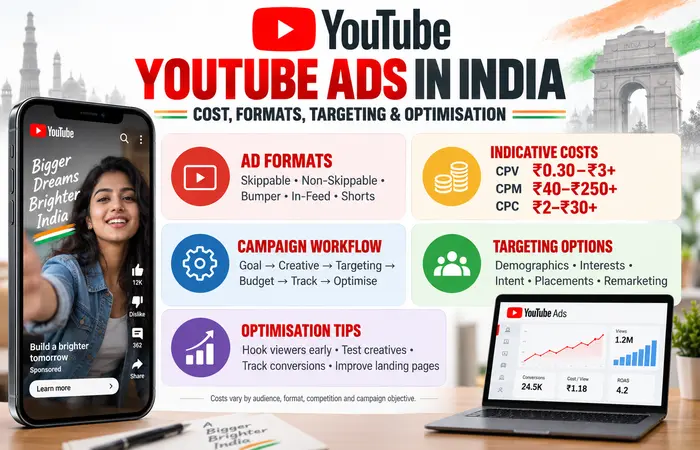
Types of YouTube Ads
The appropriate format depends on whether the campaign is intended to generate reach, video views, consideration or measurable actions.
| Suitable objective | How it appears | Common billing approach | Important limitation | YouTube ad format |
| Awareness, consideration and action | Before, during or after videos; viewers may skip after five seconds | CPV, CPM or conversion-focused bidding | The opening must earn attention quickly | Skippable in-stream |
| Reach and complete-message delivery | Plays before, during or after content without a skip option | Target CPM | Forced exposure does not guarantee attention | Non-skippable in-stream |
| Broad reach and message reinforcement | Short, non-skippable video of up to six seconds | Target CPM | Very little time for explanation | Bumper |
| Content discovery and consideration | Thumbnail and text displayed in YouTube feeds or search environments | Usually view-focused bidding | Rely heavily on the thumbnail and headline | In-feed video |
| Mobile reach and social-style engagement | Video shown between organic Shorts | Depends on campaign setup | Reused landscape videos may feel unnatural | YouTube Shorts |
| Large product launches and mass awareness | Prominent placement on the YouTube Home feed | Reservation-based buying | Generally suited to substantial budgets | Masthead |
Google currently supports campaigns capable of distributing creative across multiple formats, including skippable in-stream, in-feed and Shorts. Availability and combinations may change, so advertisers should verify the choices shown in their own accounts.
Skippable in-stream advertisements
A skippable in-stream advertisement can play before, during or after another video. The viewer can normally skip it after five seconds.
Under the view-based buying model, the charge may apply if the viewer watches for the specified time or length of ad if the ad is shorter than the criteria or clicks on the ad. The precise definition depends on the campaign and format.
This format works well when a business needs enough time to explain a problem, demonstrate a product or introduce an offer. The first five seconds are especially important because viewers can leave quickly.
Non-skippable in-stream advertisements
Non-skippable advertisements require viewers to watch the available message before continuing to their selected content.
Google describes bumper advertisements as videos of up to six seconds, while standard non-skippable ads commonly occupy the short-form range supported by the campaign. Certain longer non-skippable executions may be available on connected televisions.
These advertisements can produce reliable exposure, but an impression should not be treated as proof that the viewer remembered or accepted the message.
In-feed video advertisements
In-feed ads use video thumbnails, headline and supporting text. They may appear in discovery-oriented locations such as search results and feeds.
A user generally chooses to open the content, making this format useful for:
- Tutorials
- Product demonstrations
- Webinars
- Interviews
- Educational videos
- Detailed comparisons
- Brand stories
Because the viewer makes a more active choice, the title and thumbnail need to set an accurate expectation. Misleading thumbnails may generate initial clicks without producing useful engagement.
YouTube Shorts advertisements
Shorts ads appear within the vertical, swipe-based Shorts experience. Vertical 9:16 creative is normally the most natural fit.
A useful Shorts advertisement usually:
- Communicates the subject immediately
- Resembles mobile-first social content
- Uses readable on-screen text
- Includes sound or a clear voiceover
- Show the product or result early
- Avoids a long logo introduction
- Ends with one straightforward action
Although longer files may be supported in some setups, concise creative generally aligns more closely with Shorts viewing behaviour.
YouTube Ads Cost in India
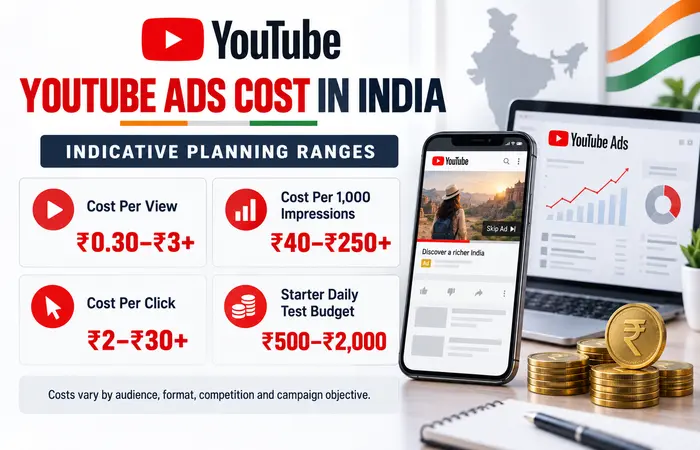
There is no official fixed rate card for standard self-service YouTube campaigns in India. Costs are determined through auctions and vary according to audience competition, format, objective, bid strategy, geography, season and creative performance.
Indicative planning ranges sometimes seen in Indian campaigns are shown below. They are working assumptions—not guaranteed prices or universal benchmarks.
| Buying metric | Illustrative planning range | What can influence it |
| Cost per view | ₹0.30–₹3 or more | Audience demand, view definition, creative and placement |
| Cost per 1,000 impressions | ₹40–₹250 or more | Reach settings, audience competition, format and season |
| Cost per click | ₹2–₹30 or more | Industry, offer, audience intent and landing-page relevance |
| Starter daily test budget | ₹500–₹2,000 | Market size, conversion value and testing requirements |
| Structured monthly test | ₹20,000–₹1,00,000+ | Number of audiences, creatives and conversion targets |
Highly competitive sectors—including finance, property, professional education and B2B software—may cost considerably more. A broad awareness campaign can also have a low CPM while producing few enquiries.
Example of a simple campaign calculation
Suppose a business spends ₹30,000 and achieves an average cost per view of ₹0.75:
Forty thousand paid views do not equal forty thousand website visitors or customers.
If 1.5% of those viewers visit the website:
If 3% of those visitors complete an enquiry:
The estimated advertising cost per enquiry would then be:
This example demonstrates why cheap views alone are not an adequate measure of campaign success.
Factors affecting YouTube ads cost in India
The main cost variables include:
Audience competition:
Advertisers may bid more aggressively for high-value groups.
Location:
A campaign targeting selected metropolitan areas may behave differently from an all-India campaign.
Seasonality:
Festivals, sale periods, admissions and financial deadlines can increase demand.
Campaign objective:
Reach, views, traffic and conversions use different optimisation signals.
Creative quality:
Strong creative can generate more useful interactions from the same budget.
Bid strategy:
Target CPM, target CPV and conversion-based strategies pursue different outcomes.
Audience size:
Excessively narrow targeting can restrict delivery and raise costs.
Frequency:
Repeatedly serving the same message may reduce incremental value.
Landing page:
A slow or confusing page may waste otherwise qualified traffic.
The advertiser needs to judge the cost against a commercial objective, e.g. Qualified lead, confirmed registration, profitable sale.
How to Create a YouTube Ad Campaign
Before opening Google Ads, decide what the campaign must achieve. “Getting more views” is not the same objective as generating purchases or qualified enquiries.
Step 1: Establish the campaign objective
Select one primary outcome, such as:
- Unique reach
- Completed or engaged video views
- Website visits
- Lead form submissions
- Calls
- Product sales
- Application installs
- Remarketing engagement
Avoid giving one campaign several competing responsibilities. A creative designed for broad brand awareness may not be suitable for immediate lead generation.
Step 2: Prepare measurement
For campaigns intended to drive actions, configure measurement before launch. Depending on the business, this may include:
- Google tag
- Google Analytics event
- Purchase confirmation
- Lead form completion
- Qualified phone call
- Appointment request
- Application install
- Offline lead import
Test the conversion action yourself. A campaign cannot optimise reliably if the recorded action is broken, duplicated or too broad.
And for instance, measuring each page visit as a conversion can overestimate the campaign success.
Step 3: Create and upload the video
Prepare at least one suitable video and upload it to YouTube. The video can be public or unlisted where the selected setup permits it.
A conversion-focused structure might follow this sequence:
- Identify the customer’s problem.
- Introduce the relevant solution.
- Demonstrate how it works.
- Provide believable supporting evidence.
- Address an important objection.
- Present one clear next action.
Create different aspect ratios when possible. A landscape video can serve in many environments, but a purpose-made vertical version normally provides a better Shorts experience.
Step 4: Create the campaign in Google Ads
Within Google Ads:
- Open Campaigns.
- Select the option to create a new campaign.
- Choose the relevant objective.
- Select an eligible video-based campaign type or subtype.
- Name the campaign clearly.
- Set the budget and campaign dates.
- Choose networks and inventory where available.
- Add geographical and language settings.
- Configure audience or content targeting.
- Supply the video and supporting assets.
- Review conversion goals and bidding.
- Check the summary before publishing.
The exact interface can change. Google’s current campaign guidance lists objectives including sales, leads, website traffic and YouTube reach, views and engagements. Review the official video campaign setup instructions while configuring the account.
Step 5: Select a bidding strategy
Match the bidding method to the objective rather than choosing the lowest apparent price.
| Campaign goal | Possible bidding focus | Primary evaluation metric |
| Broad awareness | Target CPM or reach-focused bidding | Unique reach, frequency and CPM |
| Message completion | Non-skippable reach strategy | Completed exposure and frequency |
| Video consideration | Target CPV or view-focused strategy | Views, view rate and earned engagement |
| Website action | Conversion-focused bidding | Conversion rate, CPA and conversion value |
| Online sales | Conversion value or return-focused strategy when eligible | Revenue, ROAS and profit |
An account with little conversion data may need an initial learning period. Automated bidding cannot compensate for an unclear offer or faulty tracking.
Step 6: Build focused ad groups
Keep each ad group centred on a coherent audience or content theme.
For example, a digital-marketing course could test:
- Students researching marketing careers
- Working professionals interested in upskilling
- Visitors who viewed the course page
- Viewers consuming relevant educational content
But bringing audiences into a single audience pool that they share obscures whether each segment contributed.
Step 7: Review and publish
Before launch, confirm:
- Location options reflect the intended market
- Languages match the creative and landing page
- Budget and dates are correct
- Conversion actions are appropriate
- The final URL works on mobile
- Headlines and descriptions are accurate
- Creative complies with Google Ads policies
- Remarketing lists follow consent and privacy requirements
New or edited advertisements can require a policy review before full delivery.
YouTube Ads Targeting Options
YouTube campaigns can use audience signals, content context and first-party data. The controls available depend on the selected campaign type.
Demographic targeting
Standard demographic controls may include:
- Age
- Gender
- Parental status
- Household income were supported
Detailed demographic segments can represent broader life stages or characteristics, such as students, homeowners or parents.
These categories are modelled or inferred and should not be assumed to be perfectly accurate.
Interest and intent-based audiences
Common audience approaches include:
- Affinity segments: People with sustained interest in a broad subject.
- In-market segments: People showing behaviour associated with active research or purchase consideration.
- Life-event segments: Users near a significant event where supported.
- Custom segments: Groups built using relevant search terms, applications, websites or interests, subject to campaign compatibility.
An in-market audience usually has stronger commercial context than a broad affinity audience, but it may also be more competitive.
Your data segments
Eligible advertisers can reach people who previously:
- Visited the website
- Used an application
- Watched videos on a connected YouTube channel
- Interacted with previous advertisements
- Shared permitted customer information
This is often called remarketing, although Google may use updated terminology in the account.
Audience lists require appropriate consent, data handling and minimum eligibility conditions.
Content targeting
Content-based controls may include:
- Keywords
- Topics
- YouTube channels
- Individual YouTube videos
- Eligible websites
- Applications
Google’s placement guidance may require advertisers to add a minimum number of channels or videos in certain configurations. More importantly, contextual targeting is not supported in every format or inventory source.
Read Google’s current video targeting documentation before assuming that a targeting method applies to the entire campaign.
Broad targeting versus narrow targeting
Broad targeting provides the advertising system with more opportunities to learn, but it may include users who appear less obviously relevant.
Narrow targeting offers more control but can:
- Limit impressions
- Increase auction pressure
- Slow learning
- Produce high frequency
- Make results volatile
A sensible test is to separate broader automated discovery from tightly defined remarketing or contextual activity. This makes the results easier to interpret.
YouTube Ad Specifications
Google recommends producing quality video assets and supports horizontal, vertical & square orientations. Specifications need to be confirmed prior to final production, as standards can vary.
| Asset | Recommended specification | Practical use |
| Vertical video | 1080 × 1920 pixels, 9:16 | YouTube Shorts and mobile-first placements |
| Minimum HD horizontal | 1280 × 720 pixels | Lower-resolution accepted option |
| Bumper duration | Up to six seconds | Short non-skippable reach |
| Audio | Clear dialogue or sound mix | Important for comprehension and attention |
| Captions | Strongly recommended | Supports muted viewing and accessibility |
| Minimum HD vertical | 720 × 1280 pixels | Lower-resolution vertical option |
| Thumbnail ratio | Commonly 16:9 | In-feed presentation |
| Horizontal video | 1920 × 1080 pixels, 16:9 | In-stream, feeds and connected television |
| Square video | 1080 × 1080 pixels, 1:1 | Flexible mobile and feed presentation |
Google states that YouTube can adjust videos to suit the viewer’s device without stretching or cutting the source asset. Nevertheless, advertisers should keep vital text, logos and products away from interface-sensitive areas.
Consult the official YouTube video ad specifications for current resolution, duration and asset requirements.
Creative Practices That Improve Clarity
Good creative does not need to look like an expensive television commercial. It needs to communicate quickly, remain credible and make the desired action easy to understand.
Make the opening useful
In a skippable environment, the opening should answer at least one of these questions:
- Is this relevant to me?
- What problem is being discussed?
- What will I learn or receive?
- Why should I continue watching?
Avoid spending the first five seconds on a slow animated logo unless brand recognition is the entire purpose.
Show rather than claim
A software company can demonstrate the interface. A retailer can show the product in use. A service provider can explain the process or present a genuine case example.
Evidence is more persuasive than unsupported phrases such as “best solution” or “guaranteed results”.
Use one principal call to action
Do not ask viewers to call, subscribe, download, visit, buy and follow within the same short video.
Choose the action that matches the objective:
- Learn more
- Book a consultation
- Request a quotation
- Start a trial
- View the collection
- Download the guide
Design for the placement
A 16:9 explainer can work well in-stream, while a fast vertical demonstration may be better suited to Shorts. Simply placing a landscape commercial inside a vertical frame often creates unused space and small, unreadable subjects.
Google recommends vertical assets for mobile-first inventory and confirms that they can serve across eligible video environments. Its video campaign optimisation guidance provides current format recommendations.
YouTube Ads Optimisation Tips
Optimisation should be based on the campaign objective and sufficient evidence. Making several changes every day can prevent a clear understanding of what caused a result.
1. Evaluate the correct metrics
For awareness campaigns, review:
- Unique reach
- Impression frequency
- CPM
- Viewable impressions
- Brand-lift evidence where available
For consideration campaigns, examine:
- View rate
- Average cost per view
- Watch behaviour
- Earned engagement
- Relevant website visits
For action campaigns, prioritise:
- Conversion rate
- Cost per acquisition
- Qualified-lead rate
- Conversion value
- Return on advertising spend
- Profit after fulfilment and operating costs
A high view rate is encouraging, but it does not prove commercial success.
2. Compare several creative concepts
Test genuinely different ideas rather than changing only the button colour.
Useful variables include:
- Problem-first versus product-first opening
- Customer demonstration versus expert explanation
- Short versus detailed version
- Offer-led versus educational message
- Vertical versus landscape execution
- Direct call to action versus softer consideration prompt
Use enough budget and time to collect interpretable data before naming a winner.
3. Monitor frequency and creative fatigue
Though continuous exposure can engrave brand name in mind of customers, yet too much frequency may cost a fortune and make customers irritated.
If frequency increases while response declines:
- Rotate the creative
- Expand the eligible audience
- Exclude existing customers where appropriate
- Adjust frequency controls when available
- Separate prospecting and remarketing
4. Review placement quality carefully
Placement reports can help advertisers understand where ads appeared, but reporting may not expose every impression at an individual URL or video level.
Exclude unsuitable placements where controls are available, while avoiding the assumption that an unfamiliar channel is automatically poor. Judge placement quality using campaign outcomes and brand-safety requirements together.
5. Improve the landing page
The page should continue the promise made in the advertisement.
Check whether it:
- Loads quickly on mobile
- Repeats the relevant offer
- Uses readable text
- Has a visible primary action
- Explains important conditions
- Provides privacy and business information
- Removes unnecessary form fields
- Works across common devices
A better landing page can reduce acquisition cost without changing the media bid.
6. Separate awareness from remarketing
Someone encountering a business for the first time may require explanation. A previous website visitor may respond to a product demonstration, proof point or specific offer.
Using the same message for both groups can reduce relevance.
What Results Should Advertisers Realistically Expect?
A campaign might take a while to provide some meaningful data when starting. Performance might vary, especially at the beginning while the system learns targeting and placements.
Advertisers should not assume that:
- Every view represents strong purchase intent
- A low CPV will produce low acquisition cost
- Automated bidding will work without accurate measurement
- One video is enough for long-term performance
- Retargeting audiences are unlimited
- A large budget will fix a weak offer
- Results from another industry apply to their business
For lead generation, sales quality should be checked outside the advertising dashboard. A campaign that produces many inexpensive forms may be less valuable than one producing fewer qualified conversations.
For e-commerce, include product margins, cancellations, refunds, taxes and fulfilment costs when assessing return.
A sensible testing period
There is no universal minimum, but the test should be long enough to cover normal variation in customer behaviour. A short three-day test may be misleading for services with a long decision cycle.
Set a predefined review point based on:
- Expected conversion volume
- Sales cycle length
- Daily budget
- Audience size
- Creative variants
- Weekday and weekend behaviour
Do not continue an obviously broken campaign simply to complete an arbitrary testing period. Tracking errors, irrelevant geography or a non-functioning page should be corrected immediately.
Advantages and Limitations of YouTube Advertising
| Advantages | Limitations |
| Access to extensive video inventory | Effective videos require planning and production |
| Detailed audience and content controls | Targeting signals are modelled, not perfectly precise |
| Supports awareness and conversion objectives | Cheap views may not translate into sales |
| Flexible self-service budgets | Small budgets can struggle across too many segments |
| Multiple formats across devices | One creative may not suit every placement |
| Measurable interactions and conversions | Attribution can overstate or understate influence |
| Remarketing and first-party audience options | Privacy, consent and eligibility rules apply |
| Suitable for demonstrations and explanations | Frequent exposure can cause creative fatigue |
YouTube Ads Compared With Other Advertising Platforms
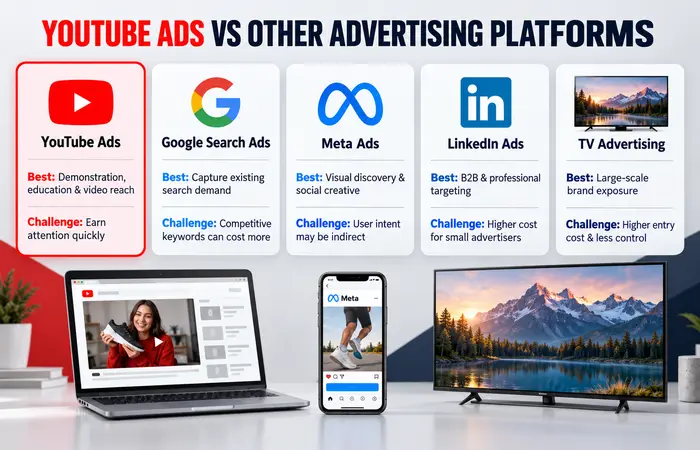
| Platform | Primary user context | Strong use case | Main challenge |
| YouTube Ads | Watching, searching for or discovering video | Demonstration, education and broad video reach | Attention must be earned quickly |
| Google Search Ads | Actively searching for an answer or provider | Capturing existing demand | Competitive keywords can be expensive |
| Meta Ads | Browsing social feeds and Stories | Visual discovery and social-style creative | User intent may be indirect |
| LinkedIn Ads | Professional networking and work-related browsing | B2B targeting and professional audiences | Costs can be high for small advertisers |
| Television advertising | Watching scheduled or on-demand programming | Large-scale brand exposure | Limited self-service control and higher entry cost |
YouTube can create or influence demand, while Search commonly captures demand already expressed through a query. Many businesses use both: video introduces the solution, and search advertising helps people return when they are ready to investigate.
Who Should Use YouTube Ads?
YouTube advertising may suit:
- Businesses with a product that benefits from demonstration
- Education providers explaining a course or career outcome
- E-commerce brands with strong visual creative
- Local businesses with suitable geographical targeting
- B2B companies capable of producing educational content
- Application developers demonstrating a workflow
- Brands seeking measurable video reach
- Advertisers with functional conversion tracking
It can be especially useful when the audience needs to see how something works before considering it.
Who Should Approach It Carefully?
YouTube advertising may be difficult when:
- The profit margin cannot support paid acquisition
- The website is slow or unreliable
- The offer is unclear
- No one can respond to generated leads
- Conversion tracking is unavailable
- The advertiser has only one weak video
- Claims cannot be supported
- The budget is spread across too many audiences
- The business expects immediate profit from an awareness campaign
In these circumstances, improving the commercial foundation may be more valuable than launching additional advertising.
Common YouTube Advertising Mistakes
Optimising only for inexpensive views
A low CPV can look impressive but may represent passive attention from people unlikely to take the next step.
Using an overly broad landing page
Sending every viewer to the homepage creates extra work. Use the most relevant product, service or campaign page.
Copying television creative without adapting it
Online viewers can skip, scroll or click. The message needs to appear earlier, and mobile readability matters.
Changing the campaign too frequently
Frequent changes make comparisons unreliable and can disrupt automated learning.
Ignoring mobile experience
Shorts and many other YouTube environments are heavily mobile-oriented. Test the video, page and form on an actual phone.
Treating platform attribution as absolute truth
Attribution is a decision-making model, not a complete record of human influence. Compare Google Ads reporting with analytics, CRM records and actual revenue.
Frequently Asked Questions
How much do YouTube ads cost in India?
YouTube ads do not have one fixed price in India. Advertisers set a budget, and costs are determined through auctions. The final cost varies according to the format, audience, location, industry, competition, creative and bidding strategy.
Can I run YouTube ads with a small budget?
Yes. The main benefit of Google Ads is the ability to budget precisely, however with a really tiny budget the amounts are just not sufficient for you to analyze multiple audiences and creative formats. Focus on the main single goal and use small number of relevant tests.
Do I need a YouTube channel to advertise?
The video used for most YouTube advertising setups needs to be hosted on YouTube, so a channel is generally required. It does not need a large subscriber base for the advertisement to run.
What is the best YouTube ad format?
There’s no answer. Skippable in-stream can cover both explanations and actions, bump Ads are effective for high frequency, In-feed Ads encourage engagement, Shorts is tailored for vertical mobile creative.
How long should a YouTube advertisement be?
Length should match the message and placement. Bumper ads get a 6-second limit, whereas skippable ads can be longer. For practical uses, just as long as it takes to make sense, and without credibility.
How quickly do YouTube campaigns produce results?
Delivery can begin after approval, but reliable conclusions usually require sufficient impressions, views or conversions. Businesses with long sales cycles may need to assess lead quality and downstream sales over several weeks.
Can YouTube advertising generate direct sales?
It can, particularly for demonstrable products and well-structured offers. However, results depend on audience intent, pricing, creative, tracking and the landing page. Advertising does not guarantee sales.
Are YouTube ads suitable for local Indian businesses?
They can be suitable when the service area is configured carefully and the budget supports the available audience. Local businesses should also monitor calls, appointment quality and whether leads are genuinely within the service area.
Conclusion
All of these allow Indian advertisers to leverage video effectively for everything from brand awareness and consideration to driving website traffic, lead generation and sales. As far as placements go-Advertisers can access skippable in-stream, non-skippable, bumper, in-feed, and Shorts placement on YouTube-setting individual targeting controls and ad campaign budgets appropriately.
The most effective starting point is not the cheapest view. It is a clear objective, an appropriate video, accurate conversion measurement and a landing page that fulfils the advertisement’s promise.
Use early campaigns as controlled tests. Test and compare new concepts of creativity and analyze and optimize leading or sales value. This method allows us to achieve a real and more believable way to improve YouTube advertising efficiency compared to measures like impressions or video views alone.
YouTube Ads Hub
Explore our YouTube advertising guides covering ad formats,
advertising costs in India, campaign creation, targeting options,
specifications and optimisation.
YouTube Ads Complete Guide →
