

Social media tools for small business can help when the same person is taking product photos, writing captions and answering customers. You do not need a large software stack to get organised. For most small businesses in India, the starting point is a way to create clear posts, publish them consistently and see whether they bring useful enquiries.
Table of Contents
Social Media Tools for Small Business Guide: Start With the Job
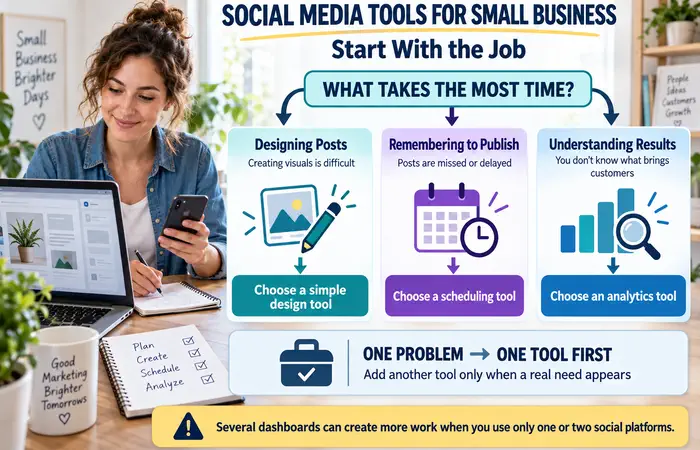
Before choosing software, write down which tasks take the most time. Is designing a post difficult? Do you forget to publish? Or do you post regularly but have no idea which content brings customers?
Choose a tool for that problem first. Adding several dashboards can create more work, particularly when you only use one or two social platforms.
Best Social Media Tools for Small Business by Task
| Task | Tool to consider | Useful starting point | Check before choosing |
| Design posts | Canva | Templates and editing tools for social graphics | Whether the template or asset you want needs a paid plan |
| Schedule across networks | Buffer | Its free plan connects up to three channels and holds 10 scheduled posts per channel | Whether your posting volume and team size fit |
| Plan and review one brand | Metricool | Its free plan includes up to 20 scheduled posts per month and 30 days of analytics | LinkedIn and X connections are excluded from that plan |
| Publish to Facebook and Instagram | Meta Business Suite | Manage those two platforms from a Meta tool | It will not cover your other social networks |
They do different things. Canva helps create, Buffer and Metricool help prepare publishing, and Meta Business Suite may be enough if Facebook and Instagram are your only platforms. The right solution is whichever stops your routine from really getting in your way. Provider features and limits change, so look at the plan on offer now.
Social Media Tools for Small Business for Beginners: A Weekly Workflow
A manageable routine matters more than a complicated calendar:
- Pick one business goal. It might be shop visits, enquiries or clicks to a product page.
- Gather material. Take genuine product photos and note the questions customers asked this week.
- Prepare three posts. Try one useful answer, one product or service explanation and one update from your business.
- Schedule and check. Confirm the correct account, image, link and time zone. Check that scheduled posts publish as expected.
- Review responses. Record relevant messages, enquiries and visits, then use them to plan next week.
Leave time to reply to people. A publishing tool can queue a post, but a customer asking about price or availability still needs an answer.
Social Media Tools for Small Business Examples
A local bakery may want to use Canva to create a straightforward weekend menu and Meta Business Suite to post it to Instagram and Facebook. Someone who manages a consultant’s posts on LinkedIn may wish to use a scheduling program that allows that account.
A clothing retailer could use a planning tool to organise new-arrival posts, then compare which posts led to product questions. In each case, the tool supports a different task. Copying another business’s software list without checking your own accounts may waste time.
Social Media Tools for Small Business Cost
You can start with free plans, but free access usually comes with limits on scheduling, connected accounts, analytics or users. Paid plans may become useful when several people need to approve posts or your business consistently exceeds a free allowance.
There is also a timetable. Templates still need accurate prices and readable text. Scheduled promotions still need checking if stock or opening hours change. Pay for a tool only when you can identify the task or limit that makes the expense worthwhile.
Social Media Tools for Small Business Tips
Keep your setup small at first. Use consistent colours and a readable font, but avoid making every post look identical. Write captions that answer a specific customer question. Before linking any account to another service, review its permissions and use the security options available.
Measure outcomes that match your goal. Reach and likes can show that people saw a post; they do not prove it generated sales. If enquiries are the goal, note how many relevant conversations each week’s content starts.
FAQs
Which social media tools for small business should I try first?
Choose the tool that solves your biggest current problem: design, scheduling or reviewing results. Test it with your existing accounts before adding another.
Do I need a paid social media tool?
Usually not at the start. Consider one when a free-plan limit repeatedly slows down work that brings a clear business benefit.
Can these tools grow my audience automatically?
No. They make parts of the work easier, but useful content, relevant platforms and timely replies still matter.
Conclusion
The best social media tools for small business are simple to integrate into a straightforward daily routine. Use the sites your customers prefer, select tools for individual functions, and observe genuine results in your business. Increase the feature set as your business’s work load does.
