


Social media tools for agencies need to do more than schedule posts. Once you manage several clients, a missed approval or a post published to the wrong account can create extra work. The useful question is whether a tool makes your team’s process clearer, from the first draft to the monthly report.
Table of Contents
Social Media Tools for Agencies Guide: Map the Work First
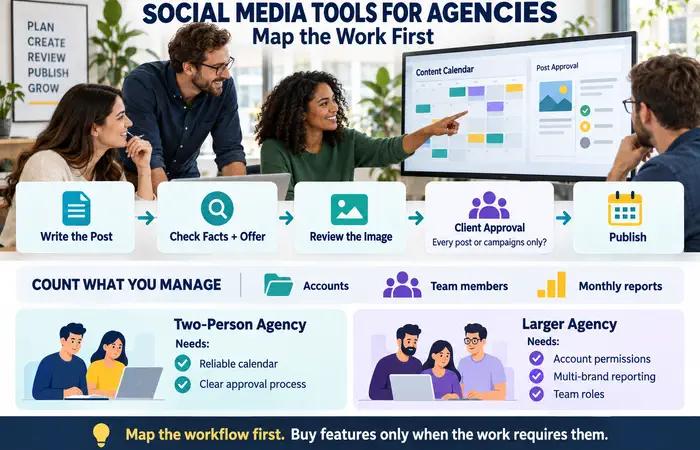
Write down what happens to a post before it goes live. Who writes it? Who checks the facts, offer and image? Does the client approve every post or only campaigns? Then note how many accounts, team members and monthly reports you manage.
This short audit tells you which features matter. A two-person agency may need a reliable calendar and a clear approval process. A larger team may also need account permissions and reporting across many brands.
Best Social Media Tools for Agencies by Need
| Tool | Consider it for | Feature or limit to check |
| Buffer | Teams that want publishing with a cost linked to connected channels | Its Team plan lists access levels and content approval workflows; pricing is shown per channel |
| Metricool | Agencies managing several brands and preparing performance reports | Check the plan’s brand allowance and which reporting and approval features it includes |
| Sendible | Teams comparing agency-focused publishing and client workflows | Check the current allowances for users, profiles and client features |
| Hootsuite | Agencies assessing a broader management platform | Match its plan features and total price to your actual team size |
There is no universal winner. Test a complete client job in a trial: create a draft, request approval, schedule it, then produce a report. A polished calendar matters less if the client finds the approval step confusing.
Social Media Tools for Agencies for Beginners: A Simple Workflow
Start with one client before moving every account into a new platform:
- Document the brief. Record the client’s audience, approved claims, brand assets and posting goals.
- Assign responsibilities. Make one person responsible for each draft and one for the final check.
- Get approval in one place. Agree who can approve posts and when feedback is due.
- Schedule and verify. Check the account, time zone, link, image and publication status.
- Report against the goal. Include relevant outcomes, what changed and what the team will test next month.
Keep a separate process for urgent updates. A scheduled promotion may need stopping if the price, stock or client’s circumstances change.
Social Media Tools for Agencies Examples
A small Indian agency managing three local businesses might prioritise a shared calendar and a clear record of client approvals. Its clients may care most about enquiries, calls or store visits, so the monthly report should explain those outcomes.
An agency handling several e-commerce brands may need more account connections, staff permissions and regular campaign reports. Its tool costs will rise with the workload, but so may the time saved on repetitive publishing and reporting. These examples show why client count alone does not determine the right plan.
Social Media Tools for Agencies Cost
Look beyond the advertised starting price. Providers may charge according to connected channels, brands, users or plan level. Work out the monthly cost for your actual number of clients and accounts, including the people who need access. Check whether approval and reporting features sit in a higher tier. Plan details change, so confirm them on the provider’s pricing page before budgeting.
Also estimate the time required to move accounts and train clients. A cheaper subscription is less useful if your team must rebuild reports manually every month.
Social Media Tools for Agencies Tips and Realistic Expectations
Give staff only the access they need and remove access when a project ends. Keep client assets and approvals organised, and check platform permissions before connecting an account. Agree on what the report will measure at the start of the contract.
Software can reduce administrative work; it cannot guarantee reach, leads or sales. Review whether it prevents errors, shortens approval time and helps your team explain results. Those are more dependable reasons to keep or change a tool.
FAQs
Which social media tools for agencies should a new team try first?
Test the tool that fits your immediate approval and publishing needs with one client. Add more accounts after the team can complete that workflow reliably.
Do agencies need client approval features?
They are useful when clients review posts before publication. Agree on the approval process even if you initially manage it outside the publishing tool.
How should an agency compare prices?
Calculate the full cost at your expected number of channels, brands and users. Include any plan upgrade needed for approvals or reports.
Conclusion
The best social media tools for agencies support a repeatable process that clients and staff can follow. Map your workflow, test it with one client and compare the full cost at your expected scale. Choose the platform that helps your team publish accurately and report clearly.
