

Social media scheduling tools are useful when you have content ready but cannot stop work to publish at the right moment. You can prepare several posts together, place them on a calendar and spend the rest of the week serving customers. The tool handles the publishing step; you remain responsible for accurate content and timely replies.
Table of Contents
Social Media Scheduling Tools Guide: How Scheduling Works
Connect an eligible social account, create a post, select a date and time, then add it to a publishing queue. Some tools let you view several accounts on one calendar. Others work within a single company’s platforms.
Before choosing, list the networks you actually post to and how often you publish. Also check whether your usual formats—such as images, videos or stories—can be scheduled in the way you expect. Test one post on each important account before planning a full month.
Best Social Media Scheduling Tools Compared
| Tool | Good starting point for | Scheduling consideration |
| Buffer | Posting to a small selection of different networks | Its free plan connects up to three channels and holds 10 scheduled posts per channel at a time |
| Metricool | Planning posts while reviewing recent results | Its free plan permits up to 20 scheduled posts per month; check supported networks |
| Meta Business Suite | A business focused on Facebook and Instagram | It does not schedule posts to unrelated networks such as LinkedIn |
These are examples, not a ranking that fits everyone. If you publish only to Facebook and Instagram, start by testing Meta Business Suite. If you need several networks on one calendar, compare Buffer and Metricool against your actual accounts and posting volume. Features and limits can change, so check each provider’s current information.
Social Media Scheduling Tools for Beginners: A Weekly Workflow
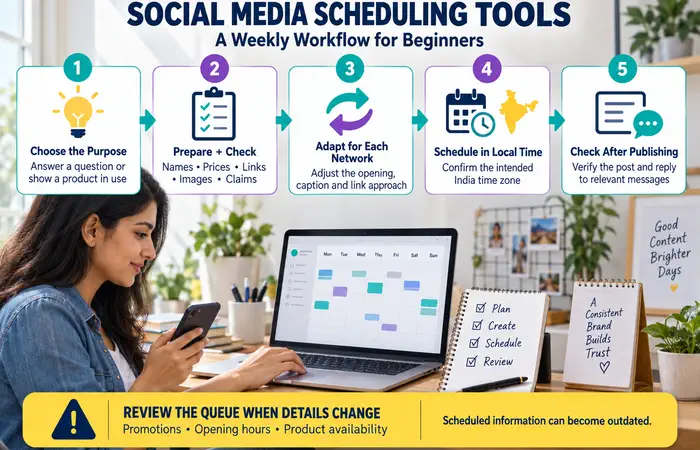
Set aside a short planning session each week:
- Choose the purpose of each post. One could answer a customer question; another could show a product in use.
- Prepare the content. Check names, prices, links, images and any claims before uploading.
- Adapt it for each network. A caption that works on Instagram may need a different opening or link approach elsewhere.
- Schedule in your audience’s time zone. For an India-focused business, confirm that the tool displays the intended local time.
- Check after publication. Make sure the post appeared correctly, then respond to relevant comments and messages.
Review the queue whenever a promotion, opening hour or product availability changes. Scheduled information can become outdated.
Social Media Scheduling Tools Examples
A local café could prepare three posts on Monday: a weekly menu, an answer to a common delivery question and a weekend reminder. It should still check the reminder if the menu changes before Saturday.
A freelance consultant might schedule educational posts for LinkedIn while reserving time each day to answer comments. An agency may need a separate approval step before any client post enters the queue. In every case, scheduling solves a timing problem; the workflow around it protects accuracy.
Social Media Scheduling Tools Cost and Limitations
Free plans can be enough for a modest posting routine, but limits may apply to connected accounts, posts waiting in a queue, monthly publishing or team access. Paid plans can make sense when you regularly hit a limit or need several people to approve and manage content.
Count your real requirements before comparing prices. A plan advertised for one channel may cost more once you connect every business account. Include the time needed to learn the tool and check scheduled posts.
Social Media Scheduling Tools Tips and Expectations
Keep a record of time-sensitive campaigns so they are easy to pause. Check account permissions, use available security settings and remove access that former team members no longer need.
Do not expect a scheduler to increase reach simply because it posts at a chosen time. Content relevance, audience behaviour and responses matter too. Judge the tool first on whether it saves time and reduces missed or incorrect posts.
FAQs
Do social media scheduling tools publish every post automatically?
That depends on the platform, account and content format. Test your regular post types before relying on a new workflow.
Which scheduling tool should a beginner choose?
Start with one that supports your active accounts and fits your weekly posting volume. Run a small trial with real posts.
Can I edit a scheduled post?
Tools commonly provide ways to change queued content, but the steps vary. Check the final version and publication time after any edit.
Conclusion
Social media scheduling tools help you plan content in advance and publish consistently. Select a tool that works with the social platforms you use and the amount you publish, start with a small queue, and regularly monitor your posts and conversations.
