




Social media analytics tools can show how people respond to your posts, but a dashboard full of numbers is only useful if you know what you are looking for. A small business seeking enquiries needs a different report from a publisher trying to understand which topics readers prefer. Start with the decision you want the data to inform.
Table of Contents
Social Media Analytics Tools Guide: Choose a Goal First
Pick one main goal for each account. If you want more people to discover your business, watch reach and visits to your profile. If you want enquiries, track relevant messages, calls or form submissions. If you want website traffic, review link clicks and what visitors do after arriving.
A like may indicate interest, but it does not tell you whether someone bought a product. Compare results over a sensible period and note what you published; a single successful post does not establish a reliable trend.
Best Social Media Analytics Tools by Use Case
| Tool | Useful for | Limitation to consider |
| Analytics within each social platform | Checking that account’s posts and audience activity | Figures from different platforms may use different definitions |
| Metricool | Viewing supported accounts together and reviewing recent performance | Its free plan covers one brand and 30 days of analytics; LinkedIn and X connections are excluded |
| Buffer | Reviewing performance alongside a publishing workflow | Its free plan lists 30 days of insights; more advanced analytics require a paid plan |
| Google Analytics | Seeing what social visitors do on your website | It measures website activity, not every interaction inside a social app |
These tools answer different questions. Start with your social accounts’ own analytics. Add a combined dashboard if switching between accounts slows your work. Add website analytics when clicks, enquiries or purchases on your site are part of the goal. Check each provider’s current features before choosing a plan.
Social Media Analytics Tools for Beginners: A Monthly Workflow
- Write down the goal and metric. For example, “more service enquiries” and “relevant messages received”.
- Record a starting point. Note the previous month’s result before changing your content.
- Label what you publish. Group posts by topic or format so you can spot useful patterns.
- Review the same period each month. Compare outcomes alongside how often you posted.
- Make one change. Try a clearer call to action or answer a question your audience repeatedly asks, then review again.
Where possible, use tagged links to distinguish social visits in website reports. Check that the link works before publishing it.
Social Media Analytics Tools Examples
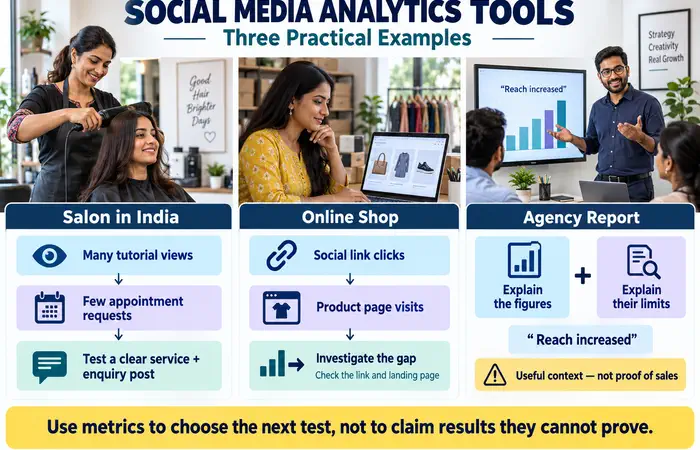
A salon in India might see a tutorial receive many views but few appointment requests. Its next test could be a post that clearly explains a service and how to enquire. An online shop might compare social link clicks with product page visits; a gap could point to an unclear link or a page that needs attention.
An agency reporting to a client should explain both the figures and their limits. “Reach increased” is useful context, but it should not be presented as proof that sales increased.
Social Media Analytics Tools Cost and Expectations
Free analytics may be sufficient for one business and a few accounts. Paid plans can add longer data history, more brands or reporting features. Calculate cost using the number of accounts and reports you actually need; check whether an important network is supported at your chosen tier.
Analytics can reveal patterns, but the figures are not a complete record of customer behaviour. People may see a post and later visit your shop directly. Some visitors also decline tracking. Treat reports as evidence to investigate, not a promise of precise attribution.
Social Media Analytics Tools Tips
Use the same definitions and date range when comparing periods. Keep paid and organic results separate, and note unusual events such as a festival promotion or a temporary closure. Limit account access to people who need it and review connected tools periodically.
Most of all, end each report with a decision. If the numbers do not help you choose what to continue, change or test, simplify the report.
FAQs
Which social media analytics tools should a beginner use?
Begin with the analytics available in your active social accounts. Add another tool when you have a specific reporting problem to solve.
Is engagement rate more important than enquiries?
It depends on your goal. For a business seeking customers, relevant enquiries may matter more than reactions, although engagement can help explain which content attracted attention.
Can analytics tell me exactly how many sales social media caused?
Sometimes you can track website conversions from social links, but offline purchases and journeys across devices make an exact total difficult to establish.
Conclusion
Social media analytics tools are most helpful when you connect their figures to a clear business question. Choose a few relevant metrics, review them consistently and use what you learn to improve the next month’s content.
