

Free social media management tools can make regular posting easier, especially when you run a small business in India and handle marketing yourself. But “free” does not mean unlimited: account connections, scheduled posts and reporting features often have limits. Here is how to choose a tool that fits the work you actually do.
Table of Contents
Free Social Media Management Tools Guide: What Do They Do?
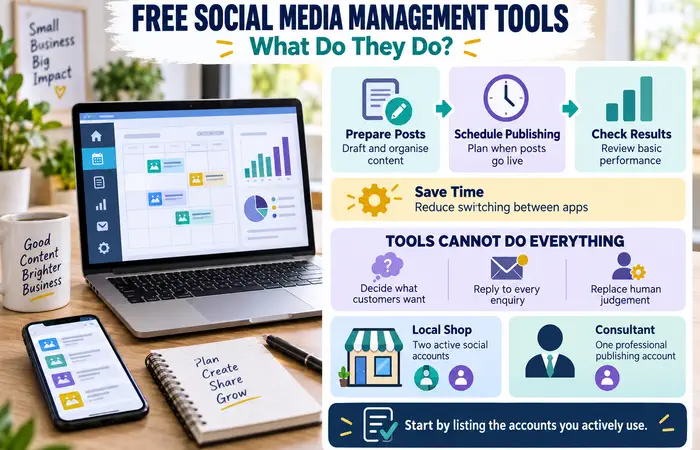
A management tool gives you a place to prepare posts, schedule publication and check results. Some work across several networks; others are built for one company’s platforms. They can save time spent switching between apps, but they cannot decide what your customers want to see or reply to every enquiry for you.
Start by listing your active accounts. A local shop posting only to Facebook and Instagram has different needs from a consultant publishing on LinkedIn as well.
Best Free Social Media Management Tools Compared
| Tool | Best fit | Useful free features | Main limitation |
| Buffer | Posting across a few different networks | Up to three channels and 10 scheduled posts per channel at a time | One user account; more scheduling capacity requires a paid plan |
| Metricool | One brand that wants planning and basic analysis | Up to 20 scheduled posts per month and 30 days of analytics | Its free plan excludes LinkedIn and X connections |
| Meta Business Suite | Managing Facebook and Instagram together | Native publishing and account management | It does not manage unrelated networks such as LinkedIn |
Buffer is a straightforward starting point if your customers use different platforms. Metricool may suit a business that wants to review recent performance as well as schedule posts. Meta Business Suite is the simplest place to begin when Facebook and Instagram are your only priorities. Check each provider’s current plan before signing up, as free features can change.
Free Social Media Management Tools Examples for Indian Businesses
Imagine a neighbourhood bakery announcing weekend specials. It may only need Instagram and Facebook, making Meta Business Suite a sensible first test. A freelance designer sharing work on Instagram and LinkedIn could test Buffer instead. A small clothing brand reviewing which recent posts attracted attention might prefer Metricool, provided its chosen networks are supported.
These are starting points, not guaranteed recommendations. Your posting frequency and the features available for each account type will affect the choice.
Free Social Media Management Tools for Beginners: A Weekly Workflow
- Choose one goal. For example, bring more people to your shop, answer common questions or generate website visits.
- Plan three useful posts. Mix a product or service update with a helpful answer and a real example of your work.
- Prepare platform-specific versions. Check image sizes, captions, links and calls to action before scheduling.
- Schedule and inspect. Confirm the correct account and time zone, then check that each post published properly.
- Review once a week. Look at relevant outcomes, such as enquiries or link visits, alongside reach and engagement.
Keep time available for comments and messages. Scheduling supports consistency; it does not replace conversations with potential customers.
Free Social Media Management Tools Cost and Limitations
The listed free plans have no subscription fee, but your time still has a cost. Creating images, checking posts and responding to people remain manual work. A tool may also restrict accounts, monthly posts, historical analytics or collaboration.
Do not upgrade simply because a dashboard offers more numbers. Consider paying when a specific limit repeatedly interrupts your workflow—for example, when several staff members need access or you consistently exceed the scheduling allowance.
Free Social Media Management Tools Tips
Connect only the accounts you actively use and enable account security features where available. Review permissions before linking a business profile. Keep an editable copy of captions and images so a failed scheduled post does not mean starting again.
For your first month, measure one practical result. If your aim is enquiries, count enquiries rather than treating follower growth as proof of sales. Expect to adjust topics and posting times; no scheduling tool guarantees reach or revenue.
FAQs
Are free social media management tools enough for a small business?
Often, yes, if you manage a few accounts and post at a modest pace. Check the account and scheduling limits against your weekly plan.
Which tool should a beginner try first?
Start with Meta Business Suite for Facebook and Instagram alone. Try Buffer if you need several types of network, or Metricool if its supported networks and basic analytics suit you.
Will scheduling posts improve engagement automatically?
No. Useful content, audience fit and timely replies still matter more than the scheduling software.
Conclusion
The best free social media management tools are the ones that support your actual accounts and posting routine. Try one for a month, check whether it saves time, and only consider a paid plan when you can name the limitation you need to remove.
