

Use a technical on page SEO checklist on the live URL, not the preview in the WordPress editor. A page can be OK in the editor and have a noindex on the live version, a different canonical or a broken resource.
Start with your most important articles and category hubs. Confirm the intended outcome for each URL before treating an audit warning as an error.
Table of Contents
Technical On-Page SEO Checklist Guide
| Check | What to confirm | Why it matters |
| URL response | The intended page loads successfully | Visitors and crawlers need access |
| Indexing | The page’s directive matches your decision | An intended public article should not be accidentally excluded |
| Canonical | It points to the preferred URL | Helps clarify duplicate or similar URLs |
| Mobile view | Text, images and links work on a phone | Readers must be able to use the page |
| Internal links | Important destinations work | Prevents dead ends |
| Resources | Main content and images load | Missing assets can change the page |
| Performance | Important pages are reasonably usable | Slow pages frustrate readers |
A canonical is a signal about the preferred URL, not a way to repair unrelated content problems. Google’s canonical documentation explains the available methods and their limits.
Best Technical On-Page SEO Checklist: Decide What the URL Should Do
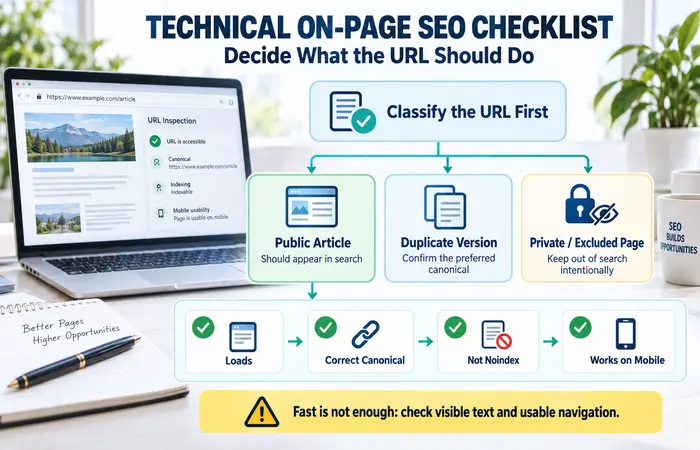
Before testing, classify the URL. Is it a public article meant to appear in search, a duplicate version, or a page you intentionally keep out of results? The correct setting follows that decision.
For an important public article, check that it loads, has the expected canonical and is not accidentally set to noindex. Then inspect it on mobile. A fast-loading page with hidden text or unusable navigation still needs work.
Technical On-Page SEO Checklist for Beginners: Workflow
- Open the published URL in a private browser window.
- Confirm the page and main content load.
- Check indexing and canonical settings in WordPress and the live output.
- Use Search Console’s URL Inspection for important Google indexing questions.
- Test a representative mobile view and important links.
- Run PageSpeed Insights if loading is a concern.
- Record the finding, intended fix and result after retesting.
Google Search Console’s overview describes URL Inspection and indexing reports. Use these to investigate a specific URL; do not assume an “excluded” label always requires intervention.
Technical On-Page SEO Checklist Examples
Suppose an article was published but is absent from search. Inspect its live URL. If it contains an accidental noindex, correct the setting and verify the output. If it is intentionally canonicalised to another page, determine which URL should represent the content before changing tags.
If a category hub looks complete on desktop but its links overlap on a phone, repair the mobile layout. If one large hero image delays a key page, test that URL and optimise the image without making it unreadable.
Technical On-Page SEO Checklist Cost and Expectations
You can begin with a browser, Search Console and PageSpeed Insights. Larger sites may benefit from a crawler to identify patterns across templates. The main cost is investigation and implementation time, especially when a theme or plugin generates the problem across many pages.
A common mistake is changing robots, canonicals and redirects at once after seeing an audit score. Make one justified change, verify its effect and document it. Google may take time to recrawl and reprocess a page; a fix is not an immediate ranking promise.
FAQs
Should every page be indexable?
No. Decide based on the page’s purpose and whether it should appear in search.
Does adding a canonical guarantee Google chooses that URL?
No. It helps indicate preference, while Google considers other signals.
Should I fix every PageSpeed warning?
Prioritise issues that materially affect important pages and the user experience.
Conclusion
A technical on-page SEO checklist helps you confirm that a live page behaves as intended. Check access, indexing, canonical signals and mobile usability, then retest each meaningful fix.
