

An internal linking checklist should start with the reader’s next question. If an article briefly mentions a task explained fully elsewhere on your site, a link can help. Links also give search engines routes to discover pages, but placing a link in every paragraph will not make an article more useful.
For a topic cluster, check both directions: a broad guide should lead to its focused articles, and each focused article should offer a sensible way back to the broader guide.
Table of Contents
Internal Linking Checklist Guide
| Check | What to do | Problem to avoid |
| Relevance | Link where the destination expands the point | Linking solely because a keyword matches |
| Anchor text | Describe the destination in ordinary words | Repeating “click here” |
| Destination | Open and inspect the target page | Broken or redirected links |
| Placement | Put the link where the reader needs it | Large unrelated link blocks |
| Important pages | Link from appropriate hubs and articles | Valuable pages with few routes in |
| Maintenance | Review links after deleting or moving pages | Links to 404 pages |
Google’s link guidance recommends crawlable links and descriptive anchor text that gives context about the destination. The surrounding sentence should still read naturally.
Best Internal Linking Checklist for a Topic Cluster
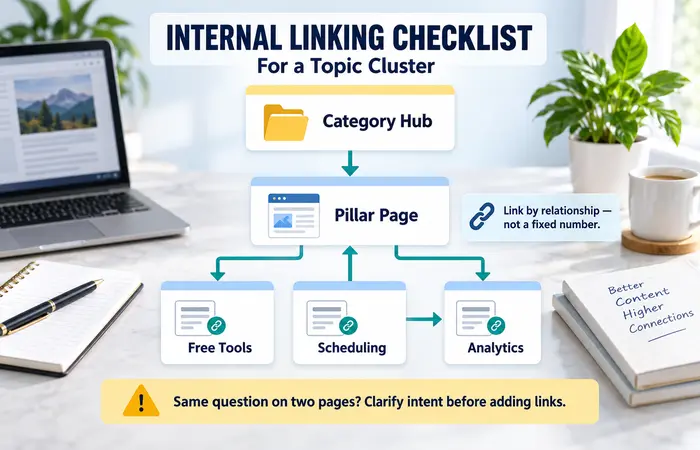
Draw a simple map: category hub → pillar page → focused articles. Identify what each page answers. Then add links based on the relationship, not a fixed number.
For example, a broad “social media management tools” guide might link to separate articles about free tools, scheduling and analytics when it introduces those needs. A scheduling article might link back to the broader selection guide and across to an analytics article where measuring results becomes relevant.
If two pages answer the same question, adding links between them will not resolve the overlap. Clarify their intent first.
Internal Linking Checklist for Beginners: Workflow
- Choose an important page and write down its purpose.
- Find related pages that genuinely expand a section.
- Add descriptive links in relevant sentences.
- Check that the destination is live and answers the implied question.
- Look for older related posts that could link to the important page.
- Check the category or resource hub for a clear route to it.
- Revisit the links when pages are moved, merged or removed.
In WordPress, use the full intended destination in the link editor and confirm the published link. Do not assume an old slug still leads directly to the correct article.
Internal Linking Checklist Examples
“Use our image SEO checklist to review file names and alt text” clearly identifies the destination. “Read more here” gives less context. If the article discusses image compression alone, however, link only if the destination genuinely helps with that next step.
A pillar about business ideas for women can introduce home-based, online and rural options. Each focused guide should explain its own angle and link to the pillar where a broader comparison helps. Readers should not have to follow six links before receiving the answer promised by the current page.
Internal Linking Checklist Cost and Tips
You can review links manually on a small site. A crawler may save time on a larger site by locating broken links and showing their source pages. Treat an automated “orphan page” label carefully: confirm how the tool discovered the URL and whether it should be part of your navigable content.
A common mistake is adding the same exact-match anchor to every article. Write for the sentence and vary the wording naturally. Another is redirecting every removed page to a broad category without checking whether it is a useful replacement.
FAQs
How many internal links should an article have?
There is no universal number. Include links that genuinely help readers move to relevant information.
Should every cluster article link to its pillar?
Usually, if the pillar adds useful broader context. Place the link where it fits the explanation.
Can broken internal links harm the reader experience?
Yes. Replace or remove them after confirming the correct destination.
Conclusion
An internal linking checklist helps you build useful routes between distinct pages. Check relevance, anchor text and destinations, then maintain the links as the site changes.