

Last Updated: August 26, 2026
Collecting contact information is hardly the one hurdle for many businesses as a small business or entrepreneur. Instead, it is the process that continues after acquiring such information which is to find out their needs and to keep in touch of leads so that their excitement towards products/services does not go cold. This post will list those Small Business Lead Generation Software and Tools. The ideal lead capture software will assist you in automating processes without a dedicated marketing or sales team.
How a business gets customers, dictates a useful tool. A local service business would get better use out of some advertising and some WhatsApp follow-ups and a B2B consultancy needs prospecting and qualification data as much as a sales pipeline.
This guide compares practical lead generation platforms for Indian small businesses. It covers their capabilities, limitations, likely costs and ideal use cases, helping you choose software based on your sales process rather than feature count alone.
Table of Contents
Quick Comparison of the Best Lead Generation Tools for Small Businesses
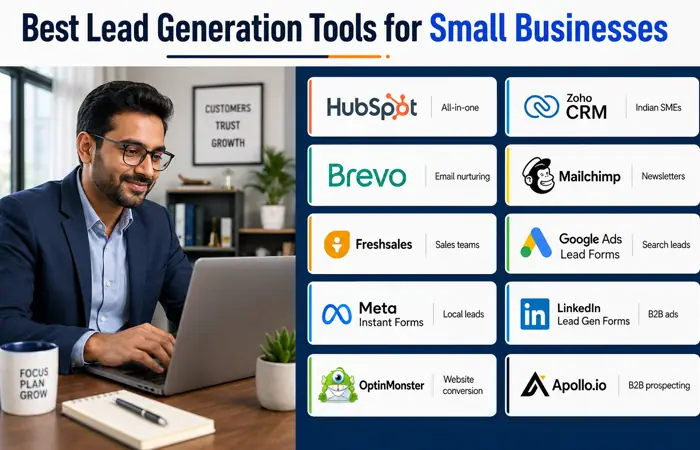
The following comparison provides a practical starting point. Pricing and plan limits can change, so businesses should confirm current details directly with each provider before subscribing.
| Tool | Best suited to | Main lead generation functions | Free access | Main limitation |
| HubSpot | Businesses wanting an integrated starting point | CRM, forms, landing pages, email, live chat and meeting booking | Free CRM and selected marketing tools | Advanced automation can become expensive |
| Zoho CRM | Indian SMEs needing custom sales processes | Lead management, pipelines, workflows and reporting | Free edition for up to three users | Initial configuration requires planning |
| Brevo | Email-led lead nurturing | Forms, email, automation, CRM and transactional messaging | Free plan available | Advanced features depend on the plan |
| Mailchimp | Newsletter and content-led businesses | Forms, landing pages, email campaigns and basic automation | Limited free plan | Less suitable for complex B2B sales pipelines |
| Freshsales | Small sales teams managing enquiries | CRM, qualification, pipelines, communication and automation | Trial or plan availability varies | Some advanced functions require paid tiers |
| Google Ads Lead Forms | Capturing high-intent search prospects | Forms displayed directly through eligible advertisements | Tool has no separate fee | Advertising spend and campaign expertise required |
| Meta Instant Forms | Local and consumer-focused campaigns | Mobile-friendly forms on Facebook and Instagram | Tool has no separate fee | High lead volume may include weak prospects |
| LinkedIn Lead Gen Forms | B2B services and professional audiences | Pre-filled forms using LinkedIn profile information | No extra form fee beyond advertising | Advertising costs may be high for small firms |
| OptinMonster | Website conversion optimisation | Pop-ups, banners, targeting rules and lead capture | Generally paid | Requires existing website traffic |
| Apollo.io | B2B prospect research and outreach | Business contact discovery, lists and outreach sequences | Limited free access may be available | Data must be verified and used responsibly |
How We Evaluated These Lead Generation Platforms
There is no universally best platform. This comparison evaluates each tool against factors that matter to a resource-constrained small business:
- Ease of setup for a small team
- Lead capture options
- CRM or contact-management capability
- Email and follow-up automation
- Integration with websites and advertising channels
- Reporting and attribution
- Suitability for Indian business workflows
- Scalability as enquiry volume increases
- Data protection and consent controls
- Overall cost relative to likely use
This is a capabilities-based comparison rather than a hands-on laboratory test. Product interfaces, pricing and plan allowances can change. Businesses should use a trial or free edition with their own workflow before committing to an annual subscription.
1. HubSpot: Best Overall Integrated Option
HubSpot combines contact management, lead capture and marketing functions in one connected environment. It is a practical choice for a small business that currently stores enquiries in spreadsheets, email inboxes and individual employees’ phones.
Its form builder can collect visitor information through an embedded website form or standalone page. You’ll be able to: Add new submissions to your CRM automatically with no manual entry – saving you tons of time HubSpot provides contact, deal, task, meeting booking and sales activity management tools for the sales team.
The company’s current free CRM offering includes contact, deal and task management, email tracking, templates, meeting scheduling and live chat. HubSpot states that its free CRM supports up to two users and 1,000 contacts, although businesses should verify limits before implementation. Its free marketing tools also include selected forms, landing pages, email and reporting capabilities. Review HubSpot’s current CRM features.
Key features
- Website and standalone lead forms
- Central contact database
- Deal and task tracking
- Email templates and engagement tracking
- Meeting scheduler
- Live chat
- Landing pages
- Basic campaign reporting
- Integrations with common business applications
Advantages
HubSpot provides a coherent journey from form submission to sales follow-up. A business does not have to connect several unrelated applications to create its first structured funnel. The interface is also relatively approachable for teams moving from spreadsheets.
Limitations
Premium automation, reporting and customisation may cost considerably more than the entry-level tools. Small businesses should check which functions are genuinely needed before upgrading.
Best for: Consultancies, agencies, education providers, B2B service companies and growing businesses seeking a combined CRM and marketing system.
2. Zoho CRM: Best for Indian Small Businesses Requiring Flexibility
Zoho CRM is particularly relevant to businesses in India because Zoho has a substantial local presence, India-specific pages and a broad suite of connected business applications.
The platform will enable teams to organize leads, customers and deals, activities, work streams. Business can choose their sales stages and have elements such as New Enquiry, Qualified, Quotation Sent, Negotiation and Won. This ensures everyone knows who is doing what, and any outstanding enquiries do not get missed.
Zoho notes its free version includes essential features for up to three users, such as leads, mobile and documents. It can also add Begin, a lightweight, pipe-focused CRM for small businesses, freelancers, and startup entrepreneurs.
Check Zoho CRM’s India offering.
Key features
- Lead, contact and deal management
- Custom sales pipelines
- Workflow rules
- Lead assignment
- Email integration
- Mobile applications
- Sales reports and dashboards
- Connection with other Zoho products
Advantages
Zoho CRM is also flexible and has a solution for different types of sales pipelines. Zoho’s interconnected applications could be suitable for any businesses also looking for applications to manage the accounts, e-mails, customers, sales and campaigns in the organization.
Limitations
The breadth of options can make the initial setup feel complicated. A business should define its sales stages, required fields and lead ownership rules before customizing the platform.
Best for: Indian SMEs, distributors, service providers and sales teams that need a configurable CRM without immediately moving to enterprise-level software.
3. Brevo: Best for Affordable Email Nurturing
Brevo may be best known for email marketing, but its capabilities are much more comprehensive. Beyond its extensive email functionality, Brevo also offers forms, automation features, contact management, a sales pipeline and selling features, transactional email capabilities, and a variety of other communication channels.
Your businesses can set up a subscription form, embedding in your website or making it available as a standalone landing page and have leads enter a sequence automatically by their action or properties. For example, a website visitor downloading a pricing guide could receive an immediate delivery email, a case study two days later and an invitation to book a consultation.
Brevo’s official documentation confirms that forms can be embedded on a website or shared as landing pages. Feature availability differs across plans, particularly for advanced messaging channels and automation. Explore Brevo’s platform capabilities.
Key features
- Signup forms
- Landing pages
- Email campaigns
- Contact segmentation
- Marketing automation
- Sales pipeline functions
- Transactional email
- SMS and other messaging options on eligible plans
Advantages
Brevo can be economical for businesses that send regular email campaigns and need basic lead nurturing. It connects lead capture with follow-up rather than treating email as a separate task.
Limitations
It may not provide the depth of sales reporting or pipeline customisation required by a complex B2B sales operation. Limits also vary between plans and communication channels.
Best for: E-commerce businesses, course providers, publishers, local services and small companies using email as their main nurturing channel.
4. Mailchimp: Best for Newsletter-Led Lead Generation
Mailchimp is a well-known one for any business that grow their leads by newsletters, eBooks, events, contents, etc. It offers signup forms, landing pages, audience management, email campaigns and selected automation features.
The platform is most appropriate when a “lead” is primarily an email subscriber who needs to be educated over time. A financial consultant, for instance, might offer a tax-planning checklist and send subscribers a sequence of explanatory emails.
Mailchimp currently promotes email marketing, landing pages, signup forms and basic automation among its core tools. Its free plan is limited and aimed at businesses with relatively small contact lists, so current contact and sending allowances should be checked before adoption. View Mailchimp’s current marketing plans.
Key features
- Hosted and embedded signup forms
- Landing pages
- Email templates
- Audience segmentation
- Basic customer journeys
- Campaign reporting
- E-commerce integrations
- A/B testing on eligible plans
Advantages
Mailchimp is relatively accessible for a business beginning email marketing. Its templates and content tools make it possible to launch campaigns without a dedicated developer.
Limitations
It’s not a complete sales CRM. Companies that require the use of individual deal stages, quote follow up, sales forecasts and/or an individual representative report would need a separate.
Best for: Bloggers, publishers, creators, online shops and small businesses that depend on email subscriptions and repeat communication.
5. Freshsales: Best for Enquiry Management by a Small Sales Team
Freshsales belongs to the Freshworks brand and provides tools that centres on helping with sales conversations and opportunities. It is a tool that could potentially help in the lead management by enabling capturing, qualification, routing and tracking the opportunities through a given sales pipeline to the sales team.
Its value becomes clearer when several employees respond to enquiries. Instead of blindly forwarding emails or keeping an updated shared spreadsheet, a manager could assign ownership, track activity, and find the deals with zero activity.
According to Fresh works, Fresh sales is a solution for conducting sales campaigns and generating, evaluating, managing and monitoring leads. Because Product edition offerings and the availability of a free trial may differ, companies should inquire about available offerings in their area for the size of team.
Review Freshsales capabilities.
Key features
- Contact and account management
- Visual sales pipeline
- Lead qualification
- Email communication
- Activity tracking
- Workflow automation
- Sales reports
- AI-assisted functions on eligible plans
Advantages
The platform is designed around the everyday work of a sales team. It can provide more structure than a general email marketing application.
Limitations
Complex pricing models could tie those more advanced scoring, automated and AI-enabled functions to higher-level plans. For smaller teams especially, verify that a plan’s basic functions meet requirements before making a jump.
Best for: Agencies, software companies, consultancies and other businesses with multiple salespeople handling inbound enquiries.
6. Google Ads Lead Forms: Best for Search-Driven Enquiries
Google Ads Lead Forms Let your website users submit their details right in an ad: This saves on effort in that a user may not have to view several pages on your site before initiating contact.
Google states that lead forms can capture interest while people are searching, discovering content or watching relevant material. Leads can be downloaded, delivered by email or sent to a compatible CRM. Read Google’s lead form documentation.
Key features
- Forms attached to eligible advertisements
- Custom lead questions
- Direct form submission
- CRM delivery options
- CSV download
- Conversion measurement
- Use across eligible campaign types
Advantages
Search advertising can capture prospects who are actively looking for a service. A form within the advertisement can shorten the path from search to enquiry, particularly on mobile devices.
Limitations
Google Ads is not a free source of leads. The form itself may not carry a separate software charge, but businesses still pay for advertising. Poor keyword selection, weak location settings or broad targeting can consume a budget without producing viable customers.
Best for: Local services, property businesses, training providers, financial services and companies targeting high-intent searches.
7. Meta Instant Forms: Best for Local and Consumer Campaigns
Meta Instant Forms collect leads through advertisements on Facebook and Instagram. The form opens within the platform, making it convenient for mobile users.
Meta provides different instant-form configurations intended to collect or qualify leads. Businesses can request contact information and add qualifying questions before a user submits the form. See Meta’s explanation of Instant Forms.
Key features
- Mobile-friendly in-platform forms
- Pre-populated contact fields
- Custom questions
- Conditional or qualifying questions where supported
- CRM integration options
- Campaign and form reporting
- Facebook and Instagram placement
Advantages
Meta can provide broad local reach and is useful for visually demonstrable services such as interiors, beauty, fitness, education and events. In-platform forms reduce the dependence on website speed and landing-page quality.
Limitations
A low cost per lead does not necessarily mean a low cost per customer. Easy-to-complete forms may attract casual users, duplicate submissions or people who do not answer calls.
Businesses should measure appointment rate, qualified-lead rate and revenue—not simply the number of forms received.
Best for: Local consumer services, coaching, events, home improvement, education, property and visually led brands.
8. LinkedIn Lead Gen Forms: Best for B2B Lead Generation
LinkedIn Lead Gen Forms are designed for professional audiences. When a member clicks an advertisement, the form can pre-fill eligible contact, work and company information from the person’s LinkedIn profile.
LinkedIn states that these forms can accompany formats such as single-image, carousel, video, event, message, document and conversation ads. The platform does not charge separately for the form, although normal advertising costs apply. Review LinkedIn Lead Gen Form specifications.
Key features
- Pre-filled professional details
- Company and job-related fields
- Custom questions
- Integration and download options
- Multiple supported advertising formats
- B2B audience targeting
Advantages
LinkedIn can help a business target prospects by professional attributes such as industry, role, seniority and company. This may be more suitable than broad consumer targeting for specialised B2B services.
Limitations
Advertising costs can be higher than those on broader social networks. Profile information can also be outdated, and submitting a form does not confirm purchasing authority.
LinkedIn requires a privacy policy URL for Lead Gen Forms and asks advertisers to explain how collected information will be used.
Best for: Recruitment firms, software providers, corporate trainers, consultants and B2B agencies.
9. OptinMonster: Best for Converting Existing Website Traffic
OptinMonster is a website conversion tool used to display pop-ups, floating bars, slide-ins and other targeted campaigns. Unlike an advertising platform, it does not independently create traffic. Its purpose is to convert more of the visitors already arriving on a website.
Campaigns can be triggered according to factors such as page, device, referral source, time on page or exit behaviour. A marketing blog might show an SEO checklist only on SEO-related articles rather than presenting the same generic newsletter form everywhere.
Key features
- Pop-ups and inline forms
- Exit-intent campaigns
- Page-level targeting
- Mobile-responsive designs
- A/B testing
- Campaign analytics
- Email-platform integrations
Advantages
Targeting allows businesses to align each offer with the visitor’s apparent interest. This can be more relevant than displaying one universal call to action.
Limitations
The platform cannot compensate for low-quality or insufficient traffic. Excessive pop-ups can also damage usability, particularly on mobile devices.
Best for: Blogs, publishers, e-commerce websites and content-rich businesses already receiving consistent organic or paid traffic.
10. Apollo.io: Best for B2B Prospecting
Apollo.io is different from an inbound form tool. It is used for B2B prospect research, account selection and structured outbound activity. Teams can search for companies and professional contacts, create lists and run outreach workflows.
This approach is useful when a business knows its ideal customer profile but cannot depend entirely on prospective customers finding its website.
Key features
- Company and professional contact database
- Prospect filters
- Contact lists
- Email sequencing
- Sales engagement
- CRM integrations
- Activity and campaign analytics
Advantages
Apollo can help a small B2B team identify organisations matching specific criteria. This is useful for a niche service with a defined target market.
Limitations
The data you find in the database may not be 100% up to date or complete. All contacts have to be checked for accuracy, and marketing activity has to be relevant, proportioned and to abide to all privacy and commercial communication law obligations. Mass automated contacting activities can severely affect sender reputation and brand confidence.
Best for: B2B agencies, software services, recruiters, consultants and specialised suppliers with a clearly defined market.
Feature Comparison by Lead Generation Stage
Tools often appear similar because they all mention “leads”, but they operate at different stages.
| Platform | Attract prospects | Capture details | Nurture leads | Manage pipeline | Outbound prospecting |
| HubSpot | Yes | Yes | Yes | Yes | Limited |
| Zoho CRM | Limited | Yes | Yes | Yes | Limited |
| Brevo | Limited | Yes | Strong | Basic | No |
| Mailchimp | Limited | Yes | Strong | Limited | No |
| Freshsales | Limited | Yes | Yes | Strong | Limited |
| Google Ads Lead Forms | Strong, paid | Strong | No | No | No |
| Meta Instant Forms | Strong, paid | Strong | Limited | No | No |
| LinkedIn Lead Gen Forms | Strong, paid | Strong | No | No | Limited |
| OptinMonster | No | Strong | Through integrations | No | No |
| Apollo.io | Yes, outbound | Yes | Yes | Limited | Strong |
A business may therefore need a small tool stack rather than one supposedly universal platform. For example, Google Ads can attract demand, HubSpot can store submissions and Brevo can manage email nurturing.
Which Tool Is Best for Each Type of Small Business?
Local service business
A combination of Google Ads or Meta Instant Forms with a simple CRM is usually practical. Search campaigns can capture existing demand, while social campaigns can introduce a service to a broader local audience.
Suitable starting stack: Google or Meta lead forms plus Zoho CRM, Bigin or HubSpot.
B2B consultancy or agency
LinkedIn can provide precise professional targeting, while Apollo can support carefully selected outbound prospecting. A CRM is necessary when enquiries involve several calls, proposals and follow-ups.
Suitable starting stack: LinkedIn Lead Gen Forms or Apollo with HubSpot, Zoho CRM or Freshsales.
E-commerce business
Email capture, segmentation and automated follow-up generally matter more than a complex deal pipeline. Brevo or Mailchimp may be sufficient until wholesale or high-value sales become important.
Suitable starting stack: Brevo or Mailchimp, connected to the online shop.
Publisher or content website
A content-led business should focus on contextual forms, useful downloadable resources and regular email communication.
Suitable starting stack: OptinMonster with Brevo or Mailchimp.
Training institute or education provider
Google and Meta forms can collect course enquiries, but a CRM is needed to record preferred courses, locations, counselling calls and admission outcomes.
Suitable starting stack: Meta or Google lead forms with Zoho CRM or Freshsales.
Lead Generation Workflow: From Campaign to Customer
Buying software does not create a complete lead generation system. The following workflow connects acquisition, qualification and sales activity.
1. Define a qualified lead
Write down the minimum criteria that indicate a genuine opportunity. These might include location, required service, budget range, business size or expected purchase date.
Without a shared definition, marketing may report high lead volume while sales reports that the enquiries are irrelevant.
2. Create a focused offer
Give prospects a reason to provide their details. Depending on the business, the offer could be:
- A quotation
- A consultation
- A product demonstration
- A checklist or guide
- A cost calculator
- A course brochure
- A trial
- An event registration
The offer should match the visitor’s stage of awareness. Someone reading an introductory guide may not yet be ready for a sales call.
3. Build the capture point
Use a landing page, website form or native advertising form. Ask only for information that will be used. Long forms can reduce submissions, while forms that ask too little may provide insufficient qualification.
A balanced first form might request a name, contact method, service of interest, location and expected timeline.
4. Connect the form to one system of record
Every submission should enter a CRM or clearly managed contact database. Avoid separate spreadsheets owned by different employees.
Record the original source, campaign, date, consent status and assigned owner. Use campaign parameters where possible to improve attribution.
5. Send an immediate acknowledgement
Confirm that the enquiry has been received and state what will happen next. Avoid pretending that an automated message is a personal reply.
For example: “Thank you for requesting a a consultation. A member of our team will contact you within one working day.”
6. Qualify and prioritise
Use explicit information, such as requested service and location, alongside behavioural signals such as repeat visits or a booked meeting.
Scoring should remain simple initially. A small business may classify leads as:
- High priority: right service, location and near-term requirement
- Medium priority: suitable profile but uncertain timing
- Low priority: incomplete, irrelevant or outside the service area
7. Follow up consistently
Define who contacts each lead, through which channel and within what period. Automation can send useful information, but complex enquiries usually need human judgement.
8. Measure commercial outcomes
Track the movement from enquiry to qualified lead, appointment, proposal and customer. This reveals whether a campaign generates real value.
Metrics That Matter More Than Lead Volume
| Metric | Calculation | What it indicates |
| Landing-page conversion rate | Leads ÷ visitors × 100 | How effectively the page captures interest |
| Cost per lead | Campaign cost ÷ total leads | Acquisition efficiency before qualification |
| Qualified-lead rate | Qualified leads ÷ total leads × 100 | Relevance of targeting and form design |
| Contact rate | Reached leads ÷ total leads × 100 | Accuracy of details and response speed |
| Appointment rate | Appointments ÷ total leads × 100 | Strength of qualification and follow-up |
| Lead-to-customer rate | Customers ÷ total leads × 100 | Overall sales effectiveness |
| Cost per customer | Campaign cost ÷ new customers | Commercial acquisition cost |
| Response time | Time between enquiry and first response | Operational speed |
Cost per lead alone can be misleading. A campaign producing 100 enquiries at ₹200 each appears better than one producing 30 at ₹500 each. However, if the first campaign creates two customers and the second creates ten, the more expensive leads are commercially superior.
Cost Comparison and Budget Planning
Exact prices change by plan, billing cycle, contact volume, advertising competition and currency conversion. Instead of comparing headline subscription prices only, calculate the full monthly cost.
| Cost area | What to include |
| Software | Subscription, user seats and contact tiers |
| Advertising | Search, social or professional-network spend |
| Integration | Connectors, automation tools and developer support |
| Implementation | CRM configuration, form creation and tracking |
| Content | Landing-page copy, design and lead magnets |
| Operations | Sales time spent qualifying and following up |
| Compliance | Consent records, privacy notices and data controls |
A very small business can begin with free CRM and email tools, but paid advertising still requires a controlled test budget. A growing team may benefit from paid automation only after its basic follow-up process is working.
Do not purchase an annual plan merely because the monthly equivalent looks cheaper. First test:
- Whether employees actually use the platform
- Whether integrations work correctly
- Whether reporting identifies the real lead source
- Whether contact limits suit expected growth
- Whether support is available when required
Realistic Performance Expectations
Lead generation software improves organisation and execution; it does not create demand automatically.
During the first month, expect to spend time configuring fields, correcting integrations and establishing a response process. Early conversion data may be unreliable if lead volume is small.
Over the next two or three months, the business should be able to identify patterns such as:
- Which campaigns generate qualified leads
- Which form questions reduce irrelevant enquiries
- How quickly the team responds
- Which lead sources produce appointments
- Where prospects leave the funnel
- Which email messages receive meaningful engagement
Results also depend on the market. An emergency local service may receive quick decisions, while business software or consultancy may require weeks or months of evaluation.
No credible tool can guarantee a fixed number of customers. Performance depends on offer quality, demand, targeting, reputation, budget, response speed and sales ability.
Common Advantages and Limitations
Advantages
- Centralises prospect information
- Reduces forgotten follow-ups
- Automates repetitive messages
- Improves campaign attribution
- Creates visibility across a sales team
- Helps segment prospects by need
- Supports more consistent measurement
- Makes handover between marketing and sales easier
Limitations
- Setup requires time and clear ownership
- Automation can feel impersonal
- Free plans may have restrictive limits
- Integrations can fail or duplicate records
- Poor data produces unreliable reports
- More leads can create operational pressure
- Advanced features may increase costs quickly
- Software cannot correct an uncompetitive offer
Lead Quality: How to Reduce Irrelevant Enquiries
Native forms are convenient, but convenience can increase low-intent submissions. The following adjustments can improve quality:
- State the service area clearly
- Mention indicative pricing where appropriate
- Add one or two qualification questions
- Explain who the service is designed for
- Use a higher-intent form type when available
- Exclude irrelevant audiences and locations
- Confirm phone numbers or email addresses
- Send conversion outcomes back to the advertising platform
- Review actual sales calls, not only dashboard data
Do not add unnecessary questions simply to make a form difficult. Every field should help qualify, route or respond to the lead.
Data Privacy and Legitimacy in India
Lead generation tools are legitimate business applications, but responsible use depends on how information is collected, stored and used.
Businesses serving people in India should review the Digital Personal Data Protection framework and any applicable sector-specific requirements. The Digital Personal Data Protection Act states that consent requests should use clear and plain language, and it provides for withdrawal of consent with comparable ease. Read the Digital Personal Data Protection Act, 2023.
A lead form should therefore explain:
- Which business is collecting the information
- What information is being requested
- Why it is needed
- How the person may be contacted
- Whether data will be shared
- How consent can be withdrawn
- Where the privacy policy can be read
Businesses using commercial SMS or calling campaigns should also review TRAI requirements. TRAI describes consent as voluntary permission to receive commercial communication concerning a specific purpose, product or service. Review TRAI’s consent guidance.
Do not upload purchased contact lists into automation software without assessing the source, consent and applicable obligations. A tool providing outreach features does not transfer legal responsibility away from the sender.
How to Choose the Right Lead Generation Tool
Start with the bottleneck
Ask where the current process fails:
- Not enough people discover the business
- Visitors do not submit enquiries
- Leads are not contacted quickly
- Employees lose track of follow-ups
- Prospects need education before buying
- Marketing cannot identify successful campaigns
- Salespeople spend too much time finding prospects
Choose software that addresses the main bottleneck.
Check the complete workflow
A form builder may collect an enquiry but do nothing with it. A CRM may organise leads but not attract them. An email tool may nurture subscribers but provide limited sales-pipeline functionality.
Map the complete journey before selecting products.
Test essential integrations
Confirm that the platform works with:
- The website or content management system
- Business email
- Advertising accounts
- Existing CRM
- E-commerce platform
- Calendar or meeting tool
- Analytics software
- Calling or messaging workflow
Consider team adoption
A sophisticated platform has little value if employees find it too cumbersome to update. Test routine tasks such as adding a note, assigning an owner, changing a stage and finding overdue follow-ups.
Examine export and portability
Confirm that contacts, consent data and activity records can be exported in a usable format. This reduces dependence on one provider and supports future migration.
Compare limits rather than “free” labels
Check user limits, contact allowances, email sends, form branding, automation steps, reporting restrictions and support access.
Final Recommendations by Use Case
| Business need | Recommended option | Reason |
| All-in-one starting point | HubSpot | Connects forms, CRM and basic marketing |
| Configurable CRM for an Indian SME | Zoho CRM | Flexible pipelines and a broad business ecosystem |
| Email nurturing on a controlled budget | Brevo | Connects forms, email and automation |
| Newsletter and content marketing | Mailchimp | Accessible publishing and audience tools |
| Sales-team lead management | Freshsales | Stronger focus on qualification and pipelines |
| High-intent search leads | Google Ads Lead Forms | Captures enquiries from eligible advertisements |
| Local consumer campaigns | Meta Instant Forms | Convenient mobile lead capture |
| B2B advertising | LinkedIn Lead Gen Forms | Uses professional audience and profile data |
| Improving website conversion | OptinMonster | Targeted forms for existing traffic |
| B2B outbound research | Apollo.io | Prospect discovery and structured outreach |
Frequently Asked Questions
What are the best lead generation tools for small businesses?
The greatest lead generation tools that suit small businesses are HubSpot (for an integrated CRM and forms tool), Zoho CRM (for customisable lead management), Brevo (for nurture emails), Google or Meta (lead forms, for acquisition in paid adverts) and LinkedIn or Apollo.io (for B2B). There are several best options, but you need to know where the business is getting leads from and how the team handles the follow-up.
Can you get free lead generation tools?
HubSpot and Zoho CRM offer free levels, whereas Brevo and Mailchimp offer limited free services. Google, Meta and LinkedIn (on its own) do not generally charge extra to create lead form types; however the business still has to pay to run the ad.
What is the most appropriate lead generation tool for Indian small businesses?
When they are looking for a customizable sales pipeline Zoho CRM is a good option for a business operating in the Indian market, or it can be useful for a business that wants to combine its CRM and forms in one platform like HubSpot, or an email-led nurture approach like Brevo. You should base this answer on the team size, workflow and budget.
Is CRM software the same as lead generation software?
These systems are different from each other, in that lead generation tools aim to attract business leads and gather the information needed, while CRM systems hold that information and assist with bringing the lead through the whole funnel. Certain systems (such as HubSpot or Zoho CRM) will integrate both.
Are Meta lead adverts effective for small companies?
Meta lead forms will prove an effective approach for businesses that serve locally, or for consumer services that have a simple offer easily demonstrated visually. Monitor the numbers for qualified leads/customers. Whilst simple forms are beneficial as they improve conversion rates due to ease of use, they can also bring in low-intent customers.
Which platform is best for B2B lead generation?
The best tool/platform to find B2B leads is LinkedIn for Paid Lead Targeting or Apollo.io for outbound prospecting data and research. Deal management and following up on opportunities is a separate process and can be handled in tools like Hubspot, ZoHo CRM or Freshsales.
How quickly ought a small business contact a new lead?
High-intent leads need to be reached out to in the best manner possible while staying realistic to your internal contact time-frames-as you should advertise exactly in your confirmation message! Whilst it sounds reasonable to aim high with immediacy, you should be prepared to be as quick and informative as you possible can.
What amount should a small company invest in lead generation software?
This investment is really dependent on lead volume, values and other aspects of the business that necessitate their use. A small company might begin with nothing at all, or with free/cheap tools and later build upon them once a consistent process for campaigning and follow-up have been developed.
Can I use my lead generation tools to guarantee sales?
No-these tools can only really improve how they are captured, stored, handled and analyzed, yet they cannot guarantee the demand, or even a customer. The conversion depends heavily on: how good the offer is, quality, pricing, trusting it, how quickly they were approached, what other demands they have those other options on the market offer.
Conclusion
When shopping for the best small business lead generation tools, you need to avoid those with the longest list of features. Instead, you want a system that matches your existing customers’ buying process, limits lost follow-ups and give you solid evidence to prove which of your work truly generates quality prospects.
Here are few of our go-to tools – It’s practical the 1st step integrated solution, useful but quite a bit of complexity Zoho for any India based SMEs looking for flexibility, email focused nurturing in Brevo, while Paid acquisition via the forms at Google, Meta & LinkedIn. OptinMonster for website conversion while LinkedIn and Apollo for B2B outbound prospecting.
